
Google Ads · July 31, 2026
Call tracking for Google Ads, and why you need it

By Zac Spencer · Owner, Crave Media

Ask a local business owner what they spend on Google Ads and they'll tell you to the dollar. Ask which campaign made the phone ring last Tuesday and the room goes quiet.
That gap is what call tracking for Google Ads closes. For a plumber, a dentist, or a roofing company, the ad click was never the point. The call is where the money changes hands, and if you can't connect calls back to the campaigns and keywords that caused them, you're steering a paid campaign by feel.
This post covers what call tracking does, what it tells you that the standard Google Ads report can't, and how to set it up without wrecking anything else.
What call tracking does
Call tracking swaps the phone number a visitor sees based on how they got to you. Someone who clicks your ad sees one number. Someone who found you through a Google search result sees another. Your real number stays the same behind the scenes; the tracking numbers just forward to it.
Because each source gets its own number, every call carries a receipt. When the phone rings, the system logs which campaign, which ad, and often which keyword produced that caller, along with how long the call lasted and, if you turn it on, a recording.
That's the whole trick. Nothing about your phones changes. The caller notices nothing. But every call now has a paper trail back to the click that caused it.
Why Google Ads is blind without it
Out of the box, Google Ads counts what happens on your website. Form fills, button clicks, purchases. For most local service businesses, that's a minority of the leads. The majority pick up the phone, especially for urgent work. Nobody fills out a contact form over a burst pipe.
So the default report shows you clicks and form fills while the main event goes uncounted. Two campaigns can look identical on paper, same spend, similar clicks, and one of them is producing three times the phone calls. Without call tracking you can't see that, which means you'll happily cut the campaign that was booking jobs and scale the one that wasn't. We've audited accounts where exactly that had been happening for months.
There's a second, quieter cost. Google's automated bidding learns from the conversions you feed it. If calls never get counted, the algorithm optimizes toward form-fillers and ignores the searches that produce callers. Feeding call data back in points the whole machine at the customers you want. One of our clients runs with full call and conversion tracking wired in, and that account has produced 1,740 tracked conversions at a 13.46% conversion rate. The tracking didn't create those results, but it's the reason we can prove them and keep tuning toward them.
If your campaigns feel busy but the phone stays quiet, tracking is usually the first thing to check. We wrote about the other common leaks in why your Google Ads aren't converting.
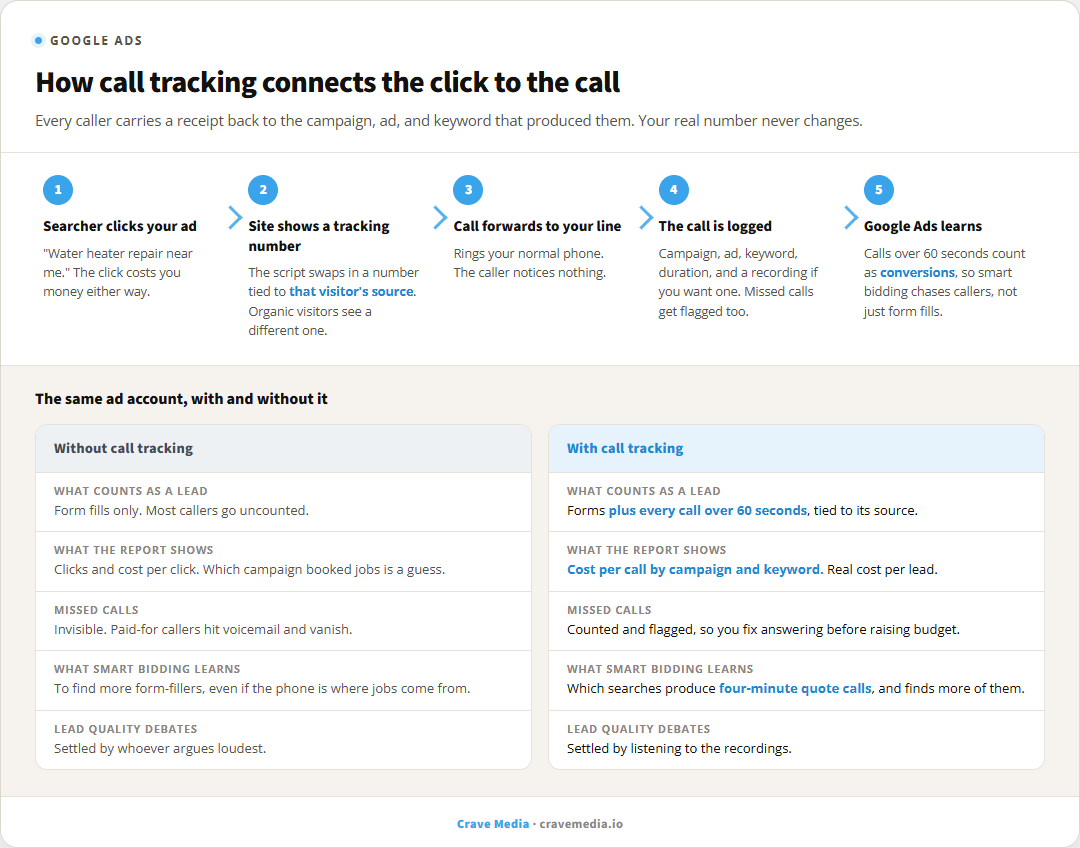
How call tracking ties a phone call back to the click that caused it, and what the same account looks like with and without the data.
What the call data tells you
The obvious win is attribution: which campaigns, ads, and keywords make the phone ring. That alone changes how you spend, because cost per lead becomes a real number instead of a guess. What a lead should cost varies by trade, and we broke down the ranges in what a good cost per lead looks like.
The less obvious wins tend to be worth more.
Call duration is a quality filter. A campaign generating thirty-second calls is generating wrong numbers and price shoppers. One generating four-minute calls is generating quotes. Same "call count" in a report, completely different businesses.
Missed calls are the painful one. The first week of call reporting almost always surfaces how many calls ring out or hit voicemail, and for busy trades it's routinely a quarter of them. Those are clicks you paid for, from people ready to talk, going to whoever answers next. Fixing that is free money compared to raising the budget.
And recordings settle arguments. When the front desk says the ads only bring tire kickers, you can listen to twenty calls and know, rather than debate. Sometimes the ads are fine and the booking rate is the leak.
Google's built-in option versus paid call tracking
Google Ads includes basic call reporting for free. Turn it on and Google swaps a forwarding number into your call assets and, with a small snippet, on your website. You get call counts by campaign, call duration, and calls counted as conversions past a length you choose.
For a lot of local accounts, that's plenty, and it's where we start. Its limits show up as you grow. Reporting stays inside Google Ads, so calls from organic search, your Google Business Profile, or LSAs stay dark. Recordings aren't included. Keyword-level detail is thinner than the paid tools offer.
Dedicated platforms like CallRail or WhatConverts run from roughly $45 a month. They track every source, not just paid ads, record calls, transcribe them, and can tell you the exact keyword behind a caller. If you're spending a few thousand a month on ads, the software costs less than one wasted click a day and answers questions the free option can't.
One caution for local businesses: keep your real number on your Google Business Profile and directory listings, and let the swapping happen on your website only, through the tracking script. Done that way, your listed number stays consistent everywhere it's published, which is what your local rankings care about. Done carelessly, with random tracking numbers pasted into listings, you can smudge the name-address-phone consistency that local SEO leans on.
What this looks like in practice
A realistic setup for a local service business takes an afternoon. Install the tracking script, set up a number pool for the website, turn on call reporting in Google Ads, and define a conversion as a call over 60 or 90 seconds so wrong numbers don't count as wins.
Then the reports start answering real questions. Which of your two campaigns books jobs. Whether Saturday ads are worth it. Whether the new landing page produces callers or just visitors. Whether your cost per lead is $28 or $90. From there, budget moves toward what works, and the smart bidding has real signals to chase.
We treat tracking as step one on every Google Ads account we run, before we touch bids or write a single ad. Optimizing without it isn't optimizing. It's redecorating.
If you're running ads right now and can't say which campaign your last five calls came from, that's fixable in a week. Request a free audit and we'll look at your account, your tracking, and where the budget is leaking. No charge, and you keep the findings either way.

About the author
Zac Spencer is an online marketing specialist and the owner of Crave Media, based in Salt Lake City, Utah. Since 2013 he has managed hundreds of Google Ads accounts across dozens of industries — with budgets from a few hundred dollars to $250K a month — and run SEO for local businesses, ecommerce shops, and international franchises.