
Facebook Ads · October 16, 2026
Facebook lead ads vs website clicks for local businesses

By Zac Spencer · Owner, Crave Media
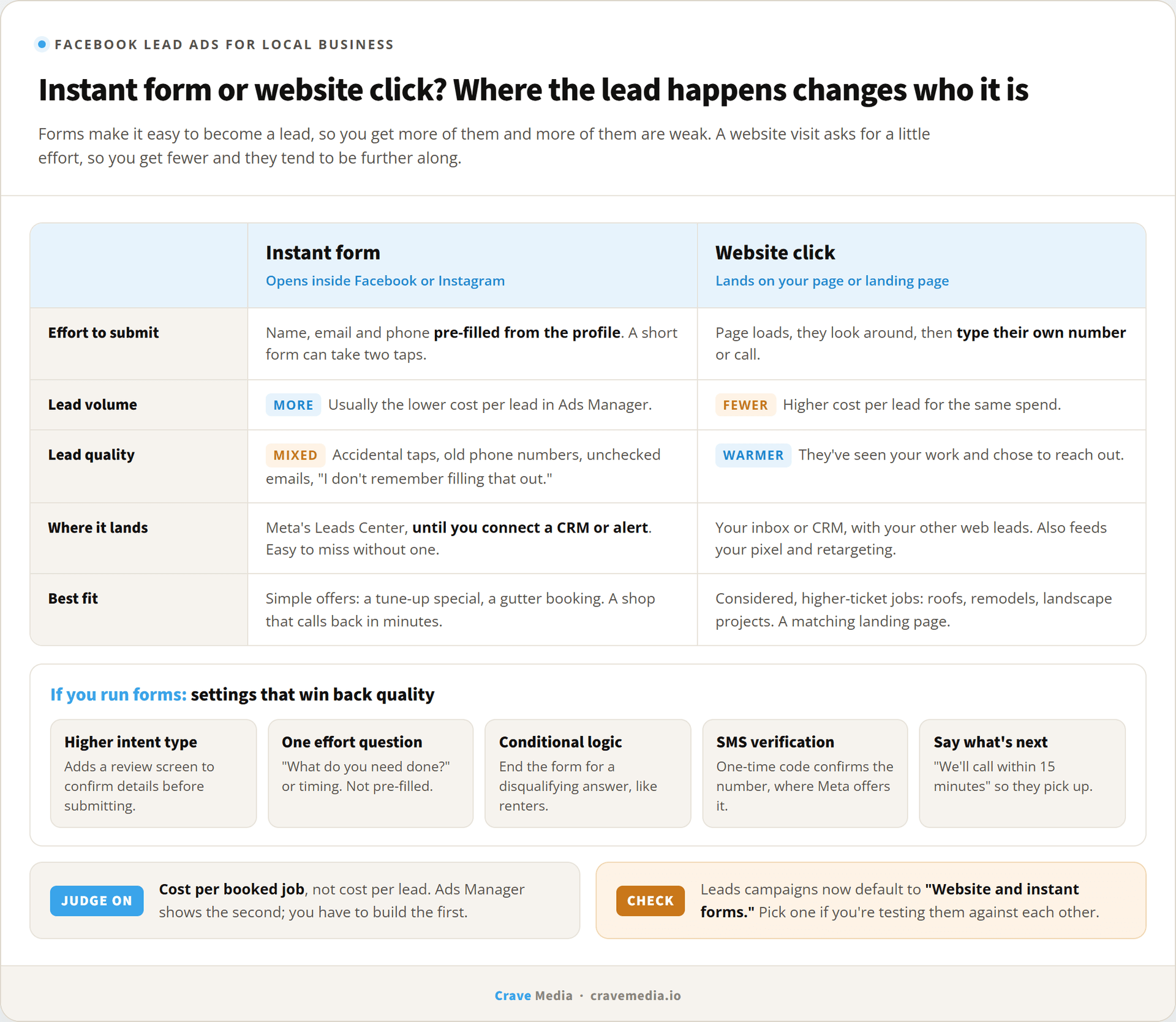
The first week of Facebook lead ads usually feels great. A local business switches from sending clicks to its website over to Meta's instant forms, and the cost per lead drops to a fraction of what it was. Then somebody starts calling those leads. Half the numbers ring through to voicemail, a few are wrong, and one person says they don't remember filling anything out.
That's the core tradeoff in Facebook lead ads for local business. Instant forms make it very easy to become a lead, so you get more of them, and many are weaker. Sending people to your website makes them work a little harder, so you get fewer, and they tend to be further along.
Which one should you run? It depends on your trade and your offer, but mostly it depends on how fast somebody in your office picks up the phone.
How Facebook instant forms work
When someone taps a lead ad, a form opens inside Facebook or Instagram. They never leave the app. Meta pre-fills their name, email, and phone number from their profile, so for a short form the whole thing can be two taps. The lead lands in Meta's Leads Center, and it stays there until you download it or connect something that moves it.
A website click works the way you'd expect. The person taps, your page loads, and they either call, fill out your form, or leave. The lead lands in your inbox or CRM, the same place your other web leads go.
One setting to check before anything else: when you build a Leads campaign, Meta's default conversion location is now "Website and instant forms," which asks for both a URL and a form and lets Meta decide who sees which. If you think you're testing one against the other, look at that field first. A lot of "the form isn't working" complaints turn out to be a campaign quietly running both.
Instant forms trade quality for volume. The settings at the bottom win some of that quality back.
Why forms bring more leads, and weaker ones
Pre-filled forms remove friction for everybody, including people who aren't buying. Someone half-paying attention can submit a form they meant to close. Someone else thinks they're entering a giveaway. The email Meta fills in can be one the person set up in 2011 and never checks, and the phone number can be years out of date. None of these people are lying to you. The form just asked almost nothing of them.
A website visitor has done more. They waited for a page to load, looked at your photos or prices, and typed their own phone number with their own thumbs. That small effort filters people. You'll get fewer website leads for the same spend, and each one is more likely to pick up when you call.
So comparing cost per lead between the two is close to meaningless. A form lead at a third of the price that books a job a fifth as often is the more expensive lead. The number that matters is cost per booked job, and we'd judge every Facebook campaign on it, even if it takes a spreadsheet and a few weeks of honest tracking to get there. Our post on what a good cost per lead looks like walks through that math by channel.
When sending clicks to your website wins
The website tends to win for considered, higher-ticket jobs. Someone thinking about a full roof replacement, a kitchen remodel, or a backyard landscape project wants to see your work before they hand over a phone number. A form that asks for their number before they've seen a single photo is asking too early.
It also wins when you already have a page built for the ad. A landing page that continues the ad's offer, loads fast on a phone, and puts the call button where a thumb can reach it will convert well, and the people who use it come in warmer. Sending Facebook traffic to a generic homepage is a different story, for the reasons we covered in landing pages vs homepages for ads.
There's a side benefit, too. Website visits feed your pixel and your retargeting audiences. Form submissions happen inside Meta, so the person never touches your site, and your retargeting pool doesn't grow from them.
When the instant form wins
A fall furnace tune-up special. Gutter cleaning before the first snow. Offers like these need almost no explaining, and the person only has to say "yes, call me," so a form that lets them do it without leaving their feed is the better tool. Forms also beat a slow site or a missing landing page, though that's a reason to fix the site, not to stay on forms forever.
All of that assumes you can call fast.
Settings that improve instant form leads
Most lead form problems we see in local accounts come from forms built on Meta's defaults. A few changes help a lot.
Switch the form type to Higher intent
Meta offers three instant form types. "More volume" is the default, a quick single-screen form. "Higher intent" adds a review screen where the person sees their information and confirms it before submitting. That one extra tap screens out a good share of accidental and careless submissions. You'll get fewer leads and should expect to pay more for each one, which is the point. Third-party guides report that Higher intent forms only deliver in the Facebook and Instagram feeds on mobile, so your placements narrow a little. For a local service business, we think that's almost always worth it.
Ask one question that takes effort
Pre-filled contact fields cost the person nothing. Add one question they have to answer themselves: "What do you need done?" as a short answer, or a multiple-choice question about timing, like "this week," "this month," or "just getting prices." A zip code question works for businesses with a tight service area.
Meta's conditional logic lets later questions change based on earlier answers, and guides describe using it to end the form for a disqualifying answer. A pest control company that doesn't service rentals can ask "Do you own or rent?" and send renters to a polite thank-you instead of your call list. Meta allows up to 15 custom questions per form. Don't use anywhere near that many. One or two is the sweet spot for a local trade.
Turn on phone number verification if you see it
Meta has an SMS verification option that texts the person a one-time code to confirm their number is real. Availability has varied by account and region, so you may not see it. If you do, use it. In the home-service accounts we see, a wrong phone number is the most common junk lead, and this setting goes straight at it.
Say what happens next
The intro and thank-you screens are where you set expectations. "We'll call you within 15 minutes during business hours to schedule" does two things. People who don't want a call drop out, and people who do want one pick up when an unfamiliar number rings.
Skip conversion leads optimization, for now
Meta can optimize delivery toward leads that turn into customers if your CRM sends status updates back through its Conversions API. It's a real improvement for large advertisers. Guides covering it put the floor at roughly 200 instant form leads a month, which rules out most local businesses. If you ever get there, revisit it.
Speed to follow-up decides everything
A form lead has a short memory. They tapped twice while scrolling, and an hour later they've seen a hundred other posts. Call in five minutes and you're the company they just contacted. Call the next morning and you're a stranger.
This isn't only a Facebook problem. In a 2011 Harvard Business Review article, researchers described sending test web leads to 2,241 U.S. companies. Only 37% responded within an hour, and the average first response took 42 hours. The firms that responded within an hour were nearly seven times as likely to qualify the lead as those that waited longer. And those were website inquiries. Instant form leads put in less effort to begin with, so expect them to cool off at least as fast.
The trap with instant forms is how easy it is for a lead to sit unseen. They land in Meta's Leads Center, and Ads Manager downloads only go back about 90 days, so a neglected account can lose leads entirely. Connect the forms to your CRM, or at minimum to an email or text alert through Meta's integrations or a tool like Zapier, so somebody's phone buzzes the moment one comes in. Then call. If they don't answer, send a text that names the offer they asked about ("Hi, it's Mike, about the furnace tune-up you asked for on Facebook"). People answer messages they recognize.
If your office can't call leads back within the hour, start with the website, not the form. Website leads hold up better to a slow response, and you'll waste less money while you fix the process.
How to test forms against your website
Don't decide this on opinion, ours included. Run two ad sets for 30 days, one sending clicks to a landing page and one using a Higher intent form, with the same audience, the same creative, and the same budget. Make sure neither is set to "Website and instant forms."
Track every lead to its outcome: reached, quoted, booked. A shared spreadsheet with one row per lead is enough; you don't need a CRM to run this. At the end of the month, divide spend by booked jobs for each side.
Thirty days on a small budget may only give you a dozen leads per side, which is thin. If the gap is close, run it another month before you decide. And if you're still deciding whether Facebook belongs in your mix at all, read whether Facebook ads still work for local businesses before you spend on either.
Count the jobs, not the forms
Ads Manager will show you cost per lead on the main screen, and instant forms will win that column nearly every time. Out of the box, it has no column for jobs booked. You have to build that one yourself, from your call log and your calendar, and it's the only one that pays the bills.
We set up Facebook and Instagram ads for local service businesses with that test built in from day one. If you're running lead forms now and aren't sure how many of them turn into jobs, request a free audit. We'll look at your form settings, your follow-up, and your real cost per booked job, and tell you whether a form or your website should be doing the work.

About the author
Zac Spencer is an online marketing specialist and the owner of Crave Media, based in Salt Lake City, Utah. Since 2013 he has managed hundreds of Google Ads accounts across dozens of industries — with budgets from a few hundred dollars to $250K a month — and run SEO for local businesses, ecommerce shops, and international franchises.