
Google Ads · August 18, 2026
How to read a Google Ads report without a marketing degree

By Zac Spencer · Owner, Crave Media
The monthly Google Ads report shows up in your inbox with fourteen metrics, nine of them trending up, and somehow you still can't answer the only question you have: did this make me money?
That's not a you problem. Google Ads reports are written in the platform's language, and the platform is happy to bury the two or three numbers you need under a pile of numbers it would rather show you. Learning how to read a Google Ads report doesn't take a marketing degree. It takes knowing which numbers to read first, which ones are diagnosis tools, and which ones exist mostly to make the report look good.
This is the same order we walk owners through when they bring us a report they don't trust.
Start with what you paid and what you got
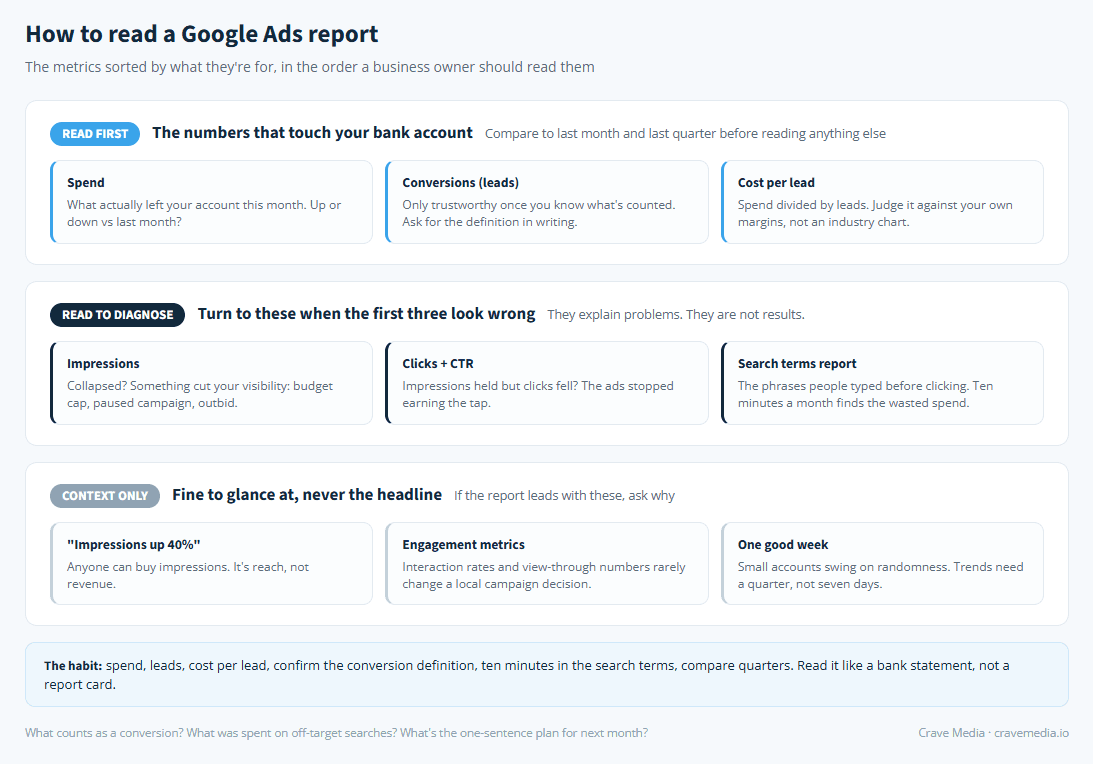
Three numbers: what you spent, how many leads came in, and what each lead cost you. Spend, conversions, cost per conversion. Everything else in the report is supporting detail for those three.
Find them, write them down, and compare them to last month before you look at anything else. A report can show climbing clicks, a better click-through rate, and a growing impression count while the only numbers that touch your bank account quietly get worse. If spend went up 20% and leads went up 5%, that's the story of the month, whatever the rest of the report is celebrating.
To judge whether your cost per lead is good or a problem, you need a target to compare it against, and that target comes from your own margins, not from an industry chart. We built what a good cost per lead looks like around exactly that math, so start there if you've never put a number on it.
Check what "conversion" means before you trust it
Here's the catch in that advice: the conversions column only means something if you know what's being counted. Depending on how the account is set up, a "conversion" might be a form fill, a phone call over 30 seconds, any phone call at all, a newsletter signup, or someone who merely visited your contact page.
Those are not the same thing, and the difference decides whether your report describes real leads or warm air. A campaign celebrating 60 conversions is less impressive when 40 of them were six-second calls from wrong numbers.
So ask, once, in writing: what counts as a conversion in my account? If calls are part of the answer, it's worth understanding how they're tracked, because default setups miss most of them. We covered that in call tracking for Google Ads. One of our clients runs at 1,740 tracked conversions with a 13.46% conversion rate, and the reason we can quote that number with a straight face is that we know exactly what each conversion is: a real call or form from a real prospect.
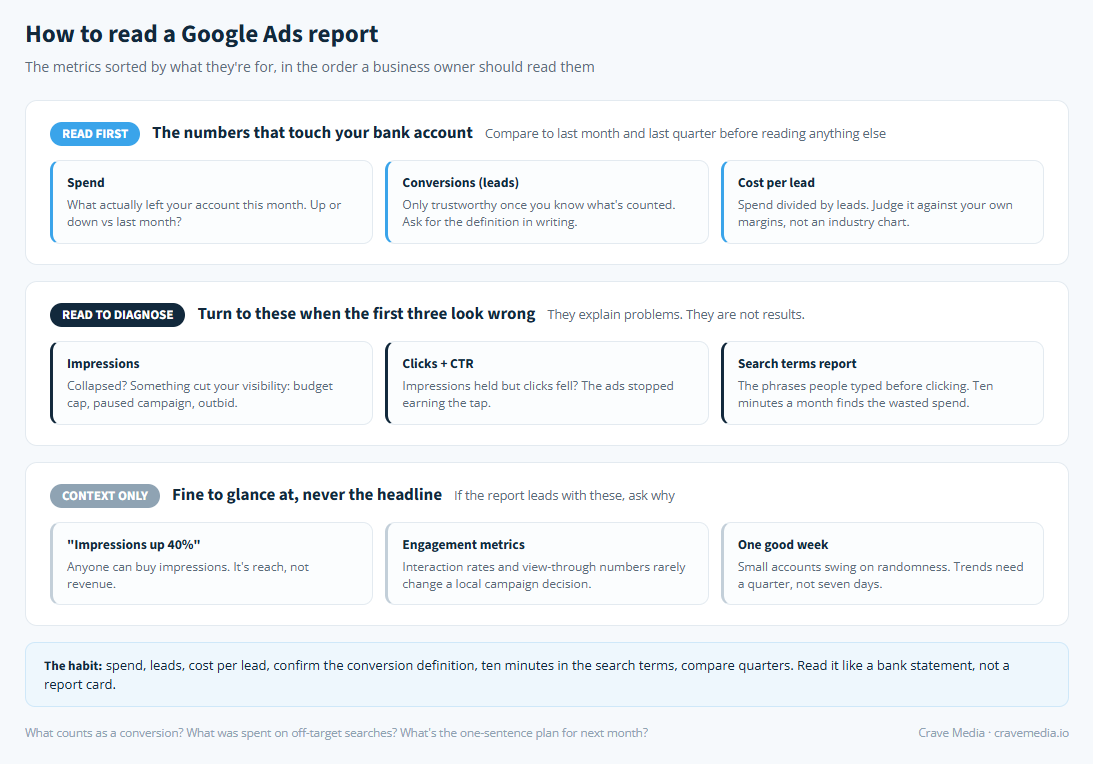
A Google Ads report sorted into the three numbers to read first, the metrics that explain problems, and the ones that are mostly decoration.
Impressions and clicks are diagnosis, not results
Impressions tell you how often your ad appeared. Clicks tell you how many people tapped it. Click-through rate is the ratio. None of them pay you.
That doesn't make them useless. It makes them second-page numbers, the ones you turn to when the first three look wrong. Leads dropped and spend didn't? Now impressions matter: if they collapsed too, something changed with your visibility (a budget cap, a paused campaign, a competitor outbidding you). If impressions held but clicks fell, the ads themselves stopped earning the tap. If clicks held but leads fell, the problem is probably after the click, on the page, which is its own conversation we've had in why your Google Ads aren't converting.
Read this way, the vanity metrics turn into a decent little troubleshooting tree. Read as results, they're how a bad month gets dressed up as a good one. "Impressions up 40%" is not an achievement. Anyone can buy impressions.
The search terms report is worth ten minutes a month
Buried a few clicks deep is the most honest page in the whole platform: the search terms report, the literal phrases people typed before clicking your ad.
Owners see their own money differently the first time they read it. There's the person who searched "water heater replacement cost" and became a customer. And there's the twelve dollars spent on "how to fix a water heater yourself," the clicks from a city you don't serve, the searches for a service you don't offer that Google decided were close enough.
You don't need to fix any of it yourself. You need to confirm somebody is. If the same off-target phrases keep appearing month after month, nobody is tending the account, and that's worth knowing regardless of who runs it.
Compare quarters, not weeks
Local-business ad accounts run on small numbers. Twenty leads a month is a fine, profitable campaign for plenty of trades, and at that size, normal randomness swings a week's results by amounts that look dramatic and mean nothing. A slow week is a slow week.
So zoom out. Compare this month against the last three months, and against the same month last year if you have it, because seasonality is real: an HVAC company's July and October reports live in different worlds. The trend across a quarter tells you whether the account is getting better. Almost nothing that happens inside seven days does.
Three questions for whoever runs your account
If an agency or a family member manages your ads, the report reading above turns into three questions worth asking every month or two.
What counts as a conversion, and has that definition changed? (If the definition changed, every comparison in the report needs an asterisk.) What did we spend on searches that had no chance of becoming a customer, and what got added to the negative list? And what's the plan for next month, in one sentence? "Keep running what works" is a perfectly good answer. No answer is not.
None of this requires you to log into the platform or learn what an ad rank is. It requires the person who does log in to know you'll be reading the receipt.
Read it like a bank statement, not a report card
A report card is something you're handed and accept. A bank statement is something you check, because it's your money and errors are your problem. Spend, leads, cost per lead, what a conversion means, ten minutes in the search terms, trends by the quarter. That's the whole skill.
If you'd like a second set of eyes on your last report, send it over through our free audit. We run Google Ads for local businesses every day, and we'll tell you in plain English what's working, what's leaking, and what we'd change first.

About the author
Zac Spencer is an online marketing specialist and the owner of Crave Media, based in Salt Lake City, Utah. Since 2013 he has managed hundreds of Google Ads accounts across dozens of industries — with budgets from a few hundred dollars to $250K a month — and run SEO for local businesses, ecommerce shops, and international franchises.