
SEO · October 23, 2026
How to rank on Google Maps without a storefront

By Zac Spencer · Owner, Crave Media
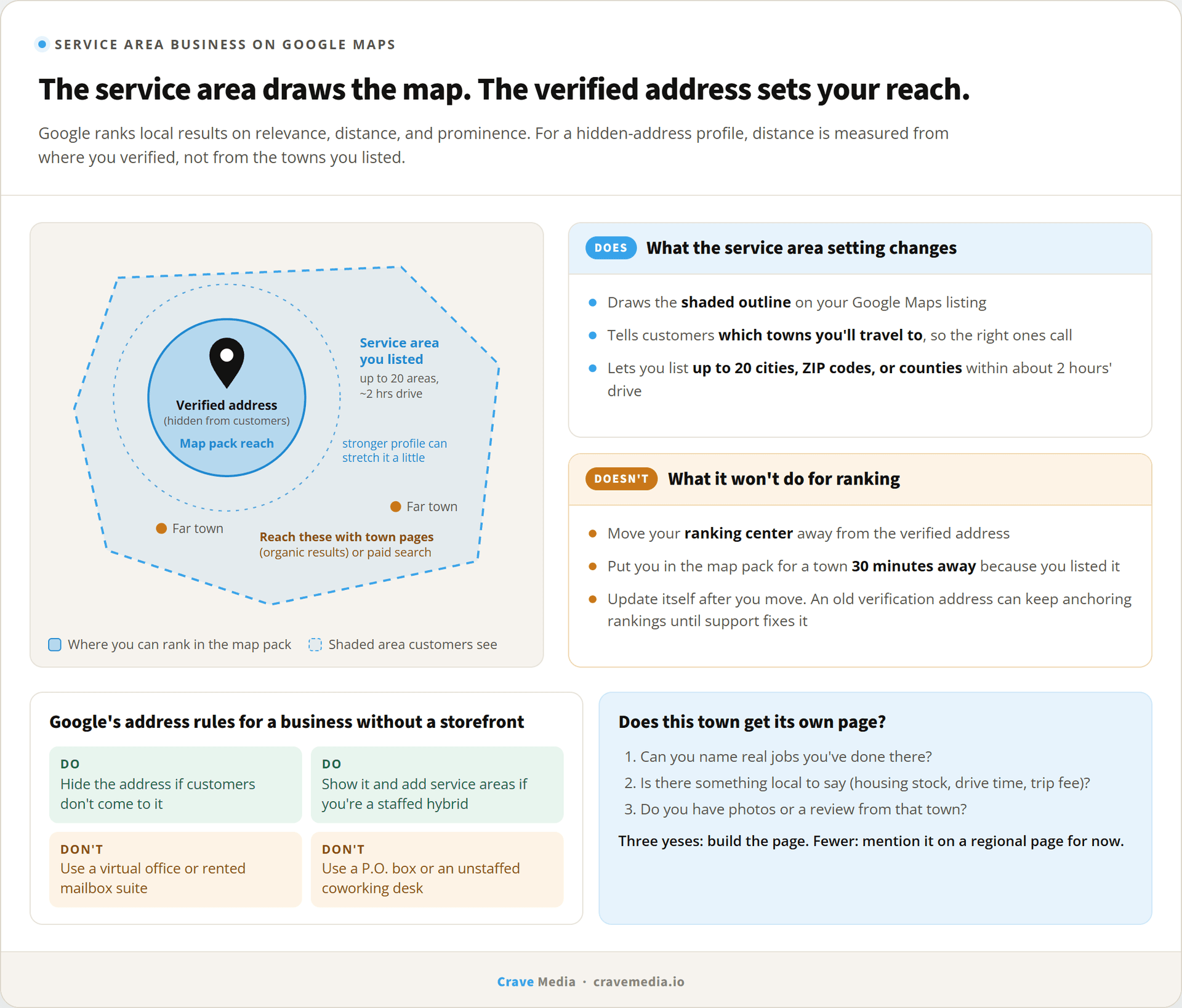
Picture a roofer working out of a shop behind his house in Kaysville. No customer has ever walked through the door, and he takes jobs from Ogden down to Sandy. When he set up his Google Business Profile, he hid the address, typed in every city he's willing to drive to, and waited to show up in the map for "roof repair Sandy." He won't. He'll show up in Kaysville, Layton, and Farmington, and not much farther.
That's normal for a service area business on Google Maps, and it trips up almost every owner who runs a business from a truck instead of a storefront. The service area box looks like a ranking setting. It isn't one. Below is how Google treats a business with no public address, and how to reach the towns your map listing can't.
How a service area business shows up on Google Maps
Google splits local businesses into three kinds. A storefront serves customers at its address. A service area business, in Google's words, "visits or delivers to customers directly but doesn't serve customers at their business address." A hybrid does both, like a plumbing company with a showroom that also sends out trucks.
If you're a service area business, Google's guidelines say you should hide your address. On the map, a hidden-address profile shows no pin at the street level. It shows your business name and a shaded outline of the areas you entered. Customers see you serve their area and call. They never see your house.
Hiding the address only changes what customers see. Google still knows exactly where you verified the profile, and that verified spot is what most of the rest of this post is about.
The address rules worth getting right
Google's rules for profiles without a storefront are short. Bending them is the quickest way we know to get a profile suspended.
- If customers don't come to your address, remove it from public view. Showing a home address to look more established breaks the guidelines.
- A virtual office isn't eligible. Google says a rented mailing address you don't operate from can't have a profile.
- A coworking desk only counts if it has your signage, is staffed by your people during business hours, and takes customers during those hours.
- P.O. boxes and remote mailboxes are out.
- One profile per real location. Two profiles for the same shop, even in different accounts, is a duplicate.
The virtual-office rule is the one that tempts people. Rent a mailbox suite in Sandy, put it on a second profile, and you'd have a pin in Sandy. Google has spent years catching exactly that, and a suspension can take your real profile down with the fake one. If a second location is real, with staff who work there, it can have its own profile. If it's a mailbox, it can't.
What the service area setting does
You can list up to 20 service areas, by city, ZIP code, or county. Google's help page says the overall area "shouldn't be more than about 2 hours of driving time from where your business is based." From Kaysville that reaches Logan, Park City, and Provo without much trouble.
The setting changes the shaded region on the map and the text customers read. Your ranking reach stays where it was. Sterling Sky, a local SEO firm that tracks this on its own listings, put it bluntly in a September 2026 write-up: ranking "is based on the address at which the business verified the listing. The only impact that the service area has is visual." Their office is in Uxbridge, Ontario, with Toronto listed as a service area, and they rank around Uxbridge.
That lines up with how Google describes local ranking. Its help page names three factors: relevance, distance, and prominence, with distance meaning "how far each business is from the customer who's searching." Nothing in that list mentions the areas you typed in. For a hidden-address profile, the business end of that distance is the verified address. Proximity got more weight in Google's December 2021 local update, which local SEOs nicknamed the Vicinity update, and businesses ranking far from their address got pulled back toward it.
How far is the reach? It depends on how crowded your category is. Darren Shaw at Whitespark puts it at a radius of roughly one to five miles around the address for most businesses, and in our experience that's about right for plumbers, HVAC, and roofers along the Wasatch Front. A rare trade in a rural county can reach much farther, because there's nobody else to show.
Our advice is to set your service area to where you'll go on a normal Tuesday, not every town you'd drive to for a big job. Listing all 20 slots doesn't move your ranking, and it invites calls from places you'll end up turning down.
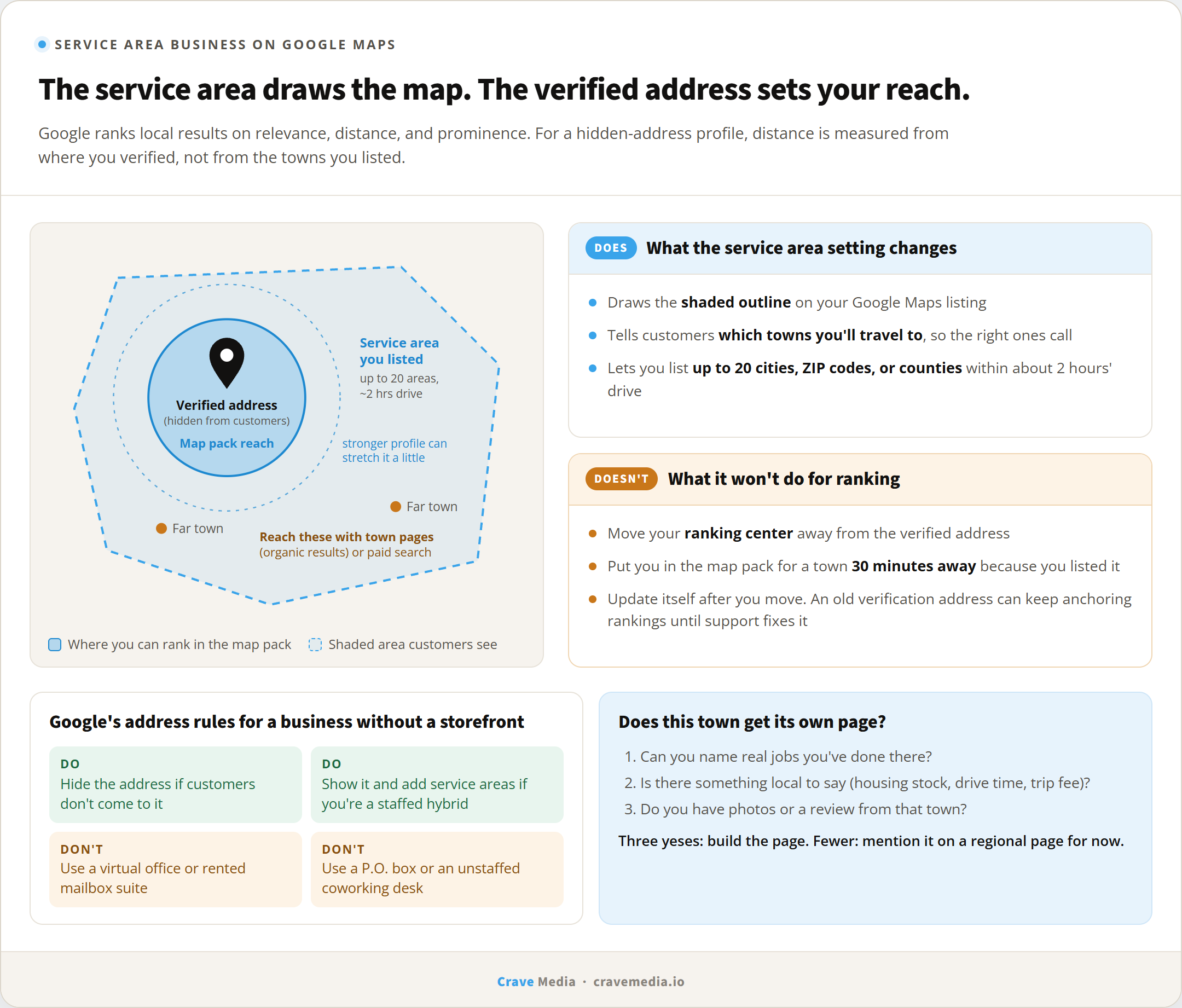
The verified address sets your Google Maps ranking reach. The service area you draw around it is mostly for customers.
The hidden-address ranking debate
Local SEOs disagree on this one, and the evidence doesn't settle it.
Whitespark's position, from an October 2024 post, is that showing or hiding the address has "absolutely no impact on your rankings," because Google ranks from the verified address either way. Sterling Sky's November 2025 study of 8,186 businesses in 200 cities, covering plumbers, HVAC, locksmiths, garage door companies, and lawn care, found a negative correlation between hidden addresses and map pack rankings for "near me" searches. They also hid and then restored the address on two home service clients and saw rankings dip and recover. That's a correlation plus two client tests. Worth taking seriously, but it isn't proof.
Our call is the boring one. If customers don't come to your address, hide it, because the guideline is clear and a suspended profile ranks nowhere. If you do have a real office where customers can show up during posted hours, you're a hybrid. Show the address, add your service areas, and you get the pin with no rule bent.
When you've moved since you verified
There's a quieter version of the radius problem. Say you verified the profile at your old house in Bountiful three years ago, then moved the business to a shop in Layton. If you updated the address but kept it hidden, Google may still be ranking you from Bountiful. Whitespark has written about this exact case.
The symptoms are rankings that cluster around a place you no longer work from. The fix is to update the address, expect Google to ask you to verify again, and if the old location seems stuck, contact Business Profile support about the verification address. Describe it as an address problem. Leave rankings out of the conversation, or you'll likely get a stock reply about how ranking works.
Town pages reach where the map won't
So the map pack has a radius, and you can't type your way past it. The regular results below the map, the blue links, work differently. A page on your website about roof repair in Sandy can rank in those organic results for "roof repair Sandy" even when your profile is too far away to make the map pack. For a business without a storefront, those pages are the main way to show up in towns outside the circle.
They also run into Google's doorway rules. Google's spam policies list "multiple domain names or pages targeting specific regions or cities that funnel users to one destination" as doorway abuse. Thirty pages that swap the city name into the same paragraph fit that description, and in our experience they get ignored, or they drag the rest of the site down.
The test we use before building a town page: can you write three true things about working in that town that wouldn't fit on the page for the next town over? Jobs you've done there and what they involved. The neighborhoods or housing stock you see most. Drive time from the shop, and whether you charge a trip fee. For a Salt Lake Valley plumber, that might be how often hard water eats water heaters in a given area. Photos from real jobs there. A review from a customer in that town, with their permission.
If you can't get to three, the town doesn't need its own page yet. Mention it on a broader regional page and revisit it once you've done more work there. In practice most service businesses end up with somewhere between three and a dozen town pages that earn their keep, not fifty. We cover how these fit with the rest of the site in our post on the pages every local business website needs.
Two things to leave off town pages: a street address in a town where you don't have one, and a map embed pretending you're based there. Both send the same mixed signal as a fake office.
Work the circle you have
A service area business can still grow on Google Maps. The growth just comes from two places. Inside the radius, the profile does the work, and the usual levers apply: category, services, photos, reviews. We went through those in how to set up a Google Business Profile that ranks and in our Ogden map pack guide, so we won't repeat them here. A strong profile tends to push that radius out a bit, since prominence can make up for some distance.
Outside it, you're leaning on the town pages above. For a town you need calls from this month, paid search can target it directly, because ads aren't tied to your verified address the way the map pack is.
Rank where you park the truck
The pin you hid is still the center of your map rankings. Google measures from the place you verified, which for most service businesses is wherever the trucks sit overnight. So win the map close to home first, and stop expecting the service area list to carry you into Sandy. The website has to do that part.
If you want to see your actual map radius, and which towns are worth a page, that's the kind of thing we map out when we take on local SEO for service businesses. Request a free audit and we'll show you where you rank across your service area today, and where a page or two would do more than another service area entry.

About the author
Zac Spencer is an online marketing specialist and the owner of Crave Media, based in Salt Lake City, Utah. Since 2013 he has managed hundreds of Google Ads accounts across dozens of industries — with budgets from a few hundred dollars to $250K a month — and run SEO for local businesses, ecommerce shops, and international franchises.