
Websites · October 20, 2026
Website accessibility basics for small businesses

By Zac Spencer · Owner, Crave Media
Pull up your website on your phone, then hand it to someone who's 70 and left their reading glasses in the truck. Watch them try to read the pale gray text on your services page, and then try to hit the tiny "x" on the popup covering your phone number. That's the everyday version of website accessibility for a small business. Can a real person with less-than-perfect eyes, hands, or hearing find out what you do and get in touch?
Owners usually hear about it from a different direction, though: a news story about ADA website lawsuits, or a sales email for an accessibility widget that promises to make those lawsuits go away with one line of code.
Below are the WCAG basics that catch most of the problems, in plain English, and the honest version of the legal picture. We're a marketing agency, not a law firm, so treat the legal part as context, not advice.
Most sites fail the same few checks
Every year WebAIM, a nonprofit at Utah State University, runs automated accessibility tests on the home pages of the top one million websites. Its February 2026 report found detectable WCAG failures on 95.9% of them, with an average of 56 errors per page. Both numbers were up from 2025.
The useful part is how repetitive the failures are. Six problems made up about 96% of everything WebAIM detected:
- Low-contrast text, on 83.9% of home pages
- Images missing alt text, 53.1%
- Form fields without labels, 51%
- Empty links, 46.3%
- Empty buttons, 30.6%
- No page language set, 13.5%
Those are big sites with real budgets. A local business site built from a template in 2019 is unlikely to do better. The upside is that none of these six take a specialist to fix. Most of them live in the theme and the contact form.
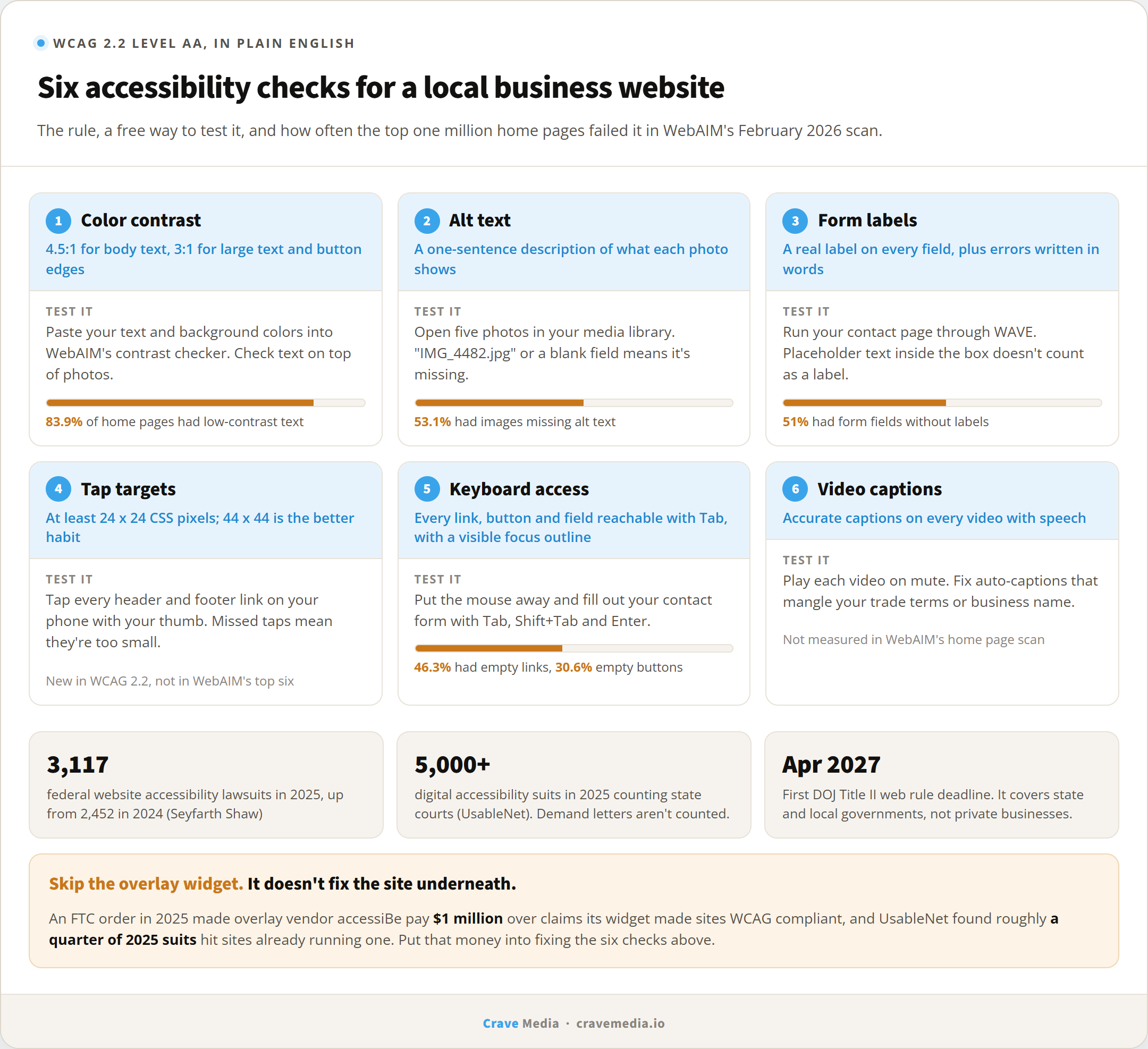
Six accessibility checks a small business can run on its own site, and how often big sites fail them.
WCAG basics without the jargon
WCAG stands for Web Content Accessibility Guidelines, published by the W3C, the group that sets web standards. The current version is WCAG 2.2, from October 2023. WCAG 3.0 exists only as a working draft and is years from replacing it. When people say a site "meets WCAG," they usually mean Level AA, the middle of three tiers, and that's the reasonable target for a small business.
You don't need to read the spec. These are the checks that matter most on a local service site.
Color contrast
Text needs enough contrast against its background. The AA rule is a ratio of 4.5:1 for normal text and 3:1 for large text, and buttons and form borders need 3:1 against what's around them. Light gray on white is the classic failure, followed closely by white text on a pale photo in a homepage banner.
Checking is free. WebAIM's online contrast checker takes two color codes and tells you pass or fail. Run it on your body text, your button colors, and anything sitting on top of a photo. If the brand blue fails on white, darken it a notch for text and keep the original for big shapes.
Alt text on images
Alt text is the short description a screen reader speaks aloud in place of an image. "Technician replacing a water heater in a garage" tells a blind visitor something. "IMG_4482.jpg" tells them nothing, and that's what many sites leave behind when photos get uploaded straight from a phone.
Describe what the photo shows and why it's there, in a sentence. Skip "image of." Purely decorative images, like a background texture, should have empty alt text so the screen reader skips them. Your logo's alt text should be your business name.
Forms people can complete
Every form field needs a real label attached in the code. Gray placeholder text inside the box doesn't count, since it disappears the moment someone starts typing. Screen readers announce the label. Without it, a blind visitor hears "edit text, edit text, edit text" and has to guess which box is the phone number.
Error messages matter too. "Please enter a valid phone number" next to the field helps everyone. A red outline with no words helps nobody who can't see red. Since your contact form is where leads come from, this one overlaps directly with the conversion basics we'd fix before spending on traffic.
Tap targets and keyboard navigation
WCAG 2.2 added a minimum target size of 24 by 24 CSS pixels for buttons and links, unless they're spaced well apart. Apple's design guidelines suggest 44 by 44 points, and in our experience the bigger number is the better habit. Text links crammed together in a mobile footer are where this usually breaks.
Then put the mouse away and press Tab. You should be able to reach every link, button, and form field in a sensible order, and you should always see where you are, usually as an outline around the focused item. Plenty of themes hide that outline because a designer thought it looked messy. Someone who navigates by keyboard is lost without it. Watch for menus that only open on hover and popups you can't close without a mouse.
Captions on video
If you have a video on the homepage, a testimonial, or a "meet the owner" clip, it needs captions. YouTube's auto-captions are a start, but they mangle trade terms and business names, so read through them and fix the errors. Captions also help the large share of people who watch video on mute.
The ADA lawsuit picture, honestly
The Americans with Disabilities Act was written in 1990, before business websites, and Title III, the part that covers private businesses, has no rule spelling out web requirements. Federal courts don't agree on how it applies to websites, especially for businesses that are online only. In March 2025 the Justice Department withdrew its 2022 web accessibility guidance along with several other ADA documents. None of that changed the law itself, and lawsuits kept coming.
The numbers: law firm Seyfarth Shaw counted 3,117 website accessibility lawsuits in federal court in 2025, up from 2,452 in 2024. New York and Florida led. Accessibility firm UsableNet, which also tracks state courts, counted just over 5,000 digital accessibility suits for the year. Neither count includes demand letters, which many small businesses get and settle without a case ever being filed.
Retailers take most of these suits, but restaurants, hotels, and service businesses show up too. Plaintiff firms are widely reported to find targets with automated scanners, and those scanners flag the same six failures WebAIM counts.
You may also hear about a federal "web rule" with 2026 or 2027 deadlines. That's the DOJ's 2024 rule under Title II, and it applies to state and local governments, not private businesses. It requires WCAG 2.1 AA. In April 2026 the DOJ pushed its deadlines back a year, to April 2027 for larger governments and April 2028 for smaller ones, and took public comments through June, so check for later changes. If you contract with a city or county, ask them what they expect from vendors.
Whether your business could be sued, and what to do if a demand letter shows up, are questions for an attorney who handles ADA cases. What we can say is that a site that passes the basics gives a plaintiff's scanning tool much less to find.
Be skeptical of accessibility overlays
If you've looked into this at all, you've seen the ads: add one line of code, get a little wheelchair icon in the corner, and your site is "compliant." We'd skip it.
Overlays try to patch accessibility problems on the fly without changing the site underneath. Some of their features, like a text-size slider, duplicate what browsers and phones already do. The underlying problems, like an unlabeled form field or a missing description, often stay broken for the screen reader users the overlay is supposed to help, and many of those users report that widgets get in the way of the tools they already use. Hundreds of accessibility practitioners have signed a public statement against overlays.
The legal track record isn't good either. In April 2025 the Federal Trade Commission finalized an order requiring accessiBe, one of the biggest overlay vendors, to pay $1 million over claims that its widget could make any site WCAG compliant. UsableNet's lawsuit reports for 2025 found that roughly a quarter of digital accessibility suits targeted sites that already had a widget installed.
Put the widget money toward fixing the site itself. A darker text color and a labeled phone field cost about the same as a few months of a widget subscription, and they keep working after you stop paying.
A 30-minute self-check
You can get a rough read on your own site this afternoon.
- Run your homepage and contact page through WAVE, WebAIM's free checker at wave.webaim.org. Focus on the red errors and the contrast warnings.
- Open your contact page, unplug the mouse, and fill out the form using only Tab, Shift+Tab, and Enter.
- Open your site on your phone and try to tap every button in the header and footer with your thumb, not your fingertip.
- Spot-check five photos for alt text. On WordPress, open the image in the media library and look at the "Alternative Text" field.
- Play any video on the site with the sound off and see if you can follow it.
Automated tools find maybe a third to half of real issues, so a clean WAVE report isn't a clean bill of health. It will catch the obvious problems, though, and the obvious ones are what get flagged first.
Most of what you'll find also makes the site work better for every visitor. Readable text and buttons sized for thumbs are on the same checklist we use for a high-converting local business website, and for the same reason.
Fix it for the person, not the lawsuit
The lawsuit numbers get people's attention, but they're a poor reason to do this work. The better reason is the visitor trying to book a furnace repair with a screen reader, or with hands that shake. If they can't use the form, they call the next company. Fix the site for that person and you've done most of what a scanning tool would check for anyway.
When we build and rebuild sites for local businesses, contrast, labeled forms, alt text, and keyboard access are part of the build, not a widget added at the end. If you want a second set of eyes on your current site, request a free audit. We'll run the checks above, show you what fails, and tell you which fixes are worth doing first.

About the author
Zac Spencer is an online marketing specialist and the owner of Crave Media, based in Salt Lake City, Utah. Since 2013 he has managed hundreds of Google Ads accounts across dozens of industries — with budgets from a few hundred dollars to $250K a month — and run SEO for local businesses, ecommerce shops, and international franchises.