
Google Ads · September 4, 2026
Google Ads for emergency services, where speed is the sale

By Zac Spencer · Owner, Crave Media
The emergency customer is not shopping
Most Google Ads advice assumes a customer who compares. They search, open three tabs, read reviews, maybe fill out a form and wait a day. Google Ads for emergency services plays by a different rule, because the person searching "burst pipe repair" at 2 AM is not comparing anything. Water is coming through the ceiling. They will call the first result that looks legitimate and answers the phone, and the job is over before the second-place ad gets a chance.
That changes almost every setting in the account. The campaigns that win for emergency plumbers, water damage crews, 24-hour locksmiths, garage door companies, and HVAC contractors in July are built for one metric: how fast a panicked stranger can reach a live human at your company. Everything else, the ad copy, the landing page, the schedule, the bids, either serves that or gets in its way.
This post covers what we change when an account serves emergency work, and where the money quietly leaks when it's set up like a normal campaign.
Put the phone number in the ad itself
For emergency searches, the website is often a detour. Call-only campaigns and call assets put a tappable phone number directly in the ad, so the searcher goes from Google to a ringing phone in one tap. No page load, no scrolling, no form. On a mobile search at 2 AM, that one removed step is worth real money.
We still recommend running standard search ads alongside call-only, for two reasons. Some people, even mid-emergency, want five seconds of reassurance before they dial, and a fast landing page gives it to them. And Google sometimes prices the two formats differently in the same auction, so running both lets the data tell you where your cheaper answered calls come from. But the call-only campaign is usually the workhorse, and if your emergency account doesn't have one, that's the first thing we'd fix in a Google Ads management engagement.
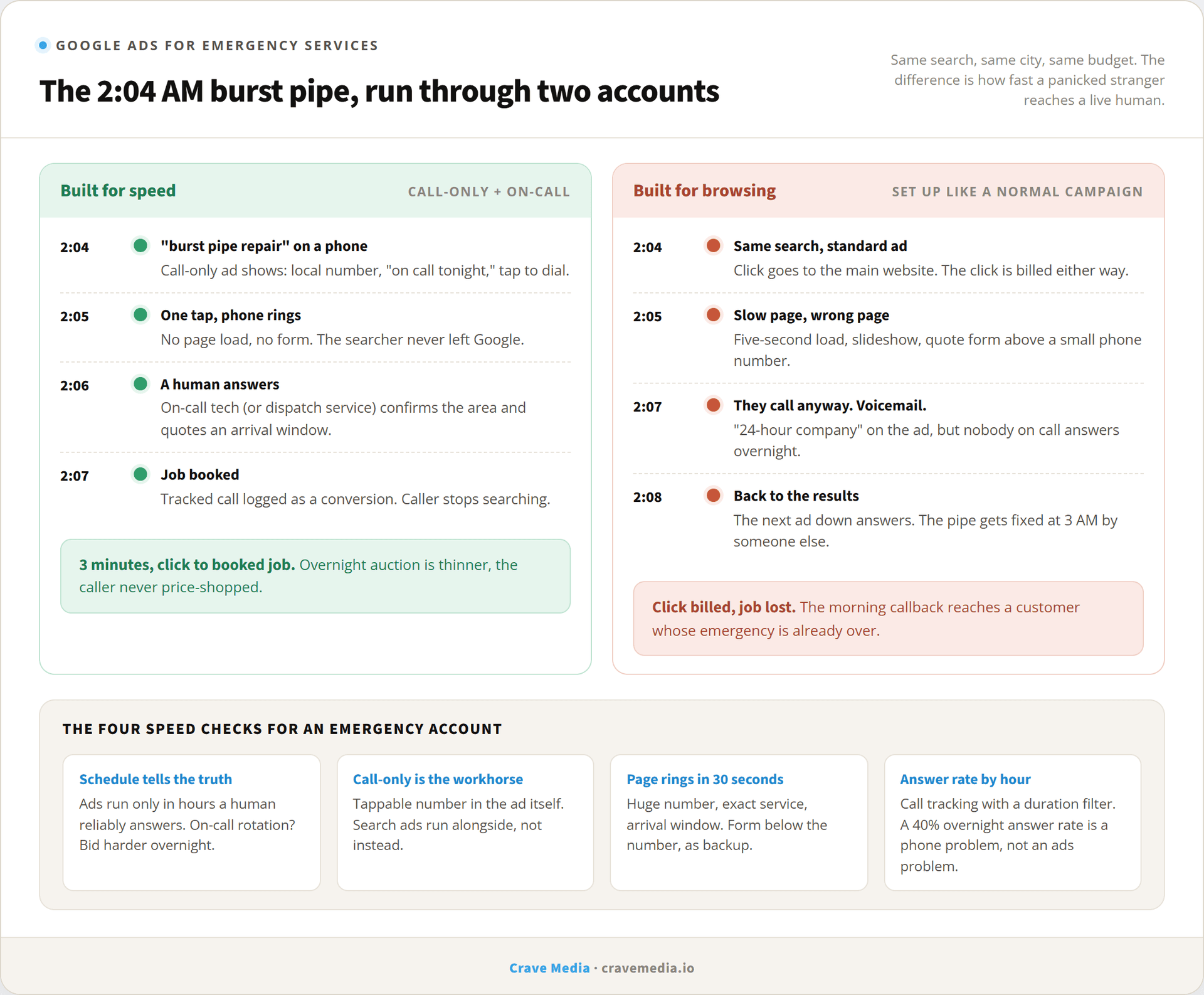
The same 2 AM search, two accounts. The one built for speed turns the click into a booked job in under three minutes. The other one pays for the click and loses the job at the landing page or the voicemail.
Only run ads when someone will answer
This is the most expensive mistake in emergency accounts, and it hides in plain sight. The ad schedule runs 24/7 because "we're a 24-hour company," but nobody reliably picks up between midnight and 6. Every one of those clicks is billed. A missed emergency call isn't a lead you'll win back with a morning callback, because the pipe got fixed at 3 AM by whoever answered. You paid Google to hand your competitor a job.
So the schedule has to tell the truth. If you have a real on-call rotation, run all night and bid harder there, because overnight competition thins out and the callers are the most desperate, least price-sensitive customers you'll ever get. If you don't, stop the ads when the phone stops being answered, and put the budget into the hours you can cover. An answering service that can dispatch, or an AI phone agent that books the job and wakes the on-call tech, changes that math; it's the kind of build our sister shop covers at crave-media.ai. Either way, the rule stands: the ad schedule and the answering schedule must match.
Bid on the words that mean right now
Emergency intent lives in the modifiers. "Emergency plumber," "24 hour locksmith," "water heater leaking," "AC not working tonight." Those searches convert at a different rate than "plumber near me," and they deserve their own campaigns with their own budgets, so a $40 emergency click never has to compete with a $12 maybe-next-week click for the same daily cap.
Just as important is what you exclude. "How to fix a burst pipe," "DIY garage door spring," "water heater replacement cost": those searchers are researching, not calling. In an emergency campaign they're pure waste, and a negative keyword list is how you keep them out. If your account spends but the phone stays quiet, search terms are the first place to look; our post on why Google Ads campaigns don't convert walks through that diagnosis in order.
One honest note on cost: emergency keywords are among the most expensive clicks in local marketing, and in some markets the big national brands bid them aggressively. Trying to outspend them is a losing game. The winnable game is answering faster than they do, showing a local number and a real arrival window, and refusing to pay for hours you can't cover. Our guide to setting a Google Ads budget covers how to size the spend without guessing.
Your landing page has one job
If the click does go to a page, the page has one purpose: get the phone to ring in the next thirty seconds. The number goes at the top, huge, tappable, repeated. The first screen answers the three things a panicked person checks: you handle this exact emergency, you cover their area, and you can come now. A line like "Techs on call tonight in Ogden, typical arrival 45 to 90 minutes" does more than any paragraph about your family values.
What kills these pages is everything designed for the browsing customer. A quote form above the phone number. A slideshow. A menu of all twelve services. And load time matters double here, because a five-second load on a phone at 2 AM is an eternity with water rising. Keep the emergency page separate from your main site pages so it can stay ruthless and fast.
Forms still belong on the page, but as the backup, below the number, for the person who can't call from where they are. Label it honestly ("fastest response is by phone") so nobody submits a form at 2 AM and waits.
Measure answered calls, not clicks
In an emergency account, a click is not a result and neither is a call that rang. The number that matters is answered calls from real prospects, and you can't manage what the account doesn't record. That means call tracking numbers on the campaign, a duration filter so a 10-second misdial doesn't count as a conversion, and call recording so you can hear whether the 2 AM calls are booking or bouncing. We covered the setup in our post on call tracking with Google Ads.
Then watch one metric nobody puts on a dashboard: your answer rate on ad calls, by hour. One of our clients ran 1,740 Google Ads conversions at a 13.46% conversion rate, and the unglamorous work behind numbers like that is making sure the calls the ads generate get picked up at all. If your answer rate overnight is 40%, you don't have an ads problem. You have a phone problem the ads are billing you for.
The fastest yes wins
Emergency work is the purest version of what local advertising is supposed to do: connect someone who needs help now with someone who can come now. Google Ads is very good at the first half. The second half is your schedule and your phone, and most of the leaks live there, not in the bids.
If your emergency campaigns are spending money while the after-hours calls go to voicemail, we'll find where the budget is leaking. Request a free audit and we'll go through the account, the schedule, and the call log together.

About the author
Zac Spencer is an online marketing specialist and the owner of Crave Media, based in Salt Lake City, Utah. Since 2013 he has managed hundreds of Google Ads accounts across dozens of industries — with budgets from a few hundred dollars to $250K a month — and run SEO for local businesses, ecommerce shops, and international franchises.