
SEO · November 13, 2026
How to set Google Business Profile holiday hours

By Zac Spencer · Owner, Crave Media
The day after Thanksgiving, someone in Layton needs a replacement part for a furnace that quit overnight. Google says your shop is open until 5. They drive over, find the lot empty and the door locked, and sit in the car writing a one-star review before they pull out. Your work had nothing to do with it. That review is a Google Business Profile holiday hours problem, and it will sit under your name for years.
Thanksgiving is Thursday, November 26 this year, which leaves two weeks to fix this. It's ten minutes of work, and you can do the whole season, Thanksgiving through New Year's, in one sitting.
Holiday hours are special hours to Google
Your profile has four separate hour settings, and most of the mistakes come from using the wrong one.
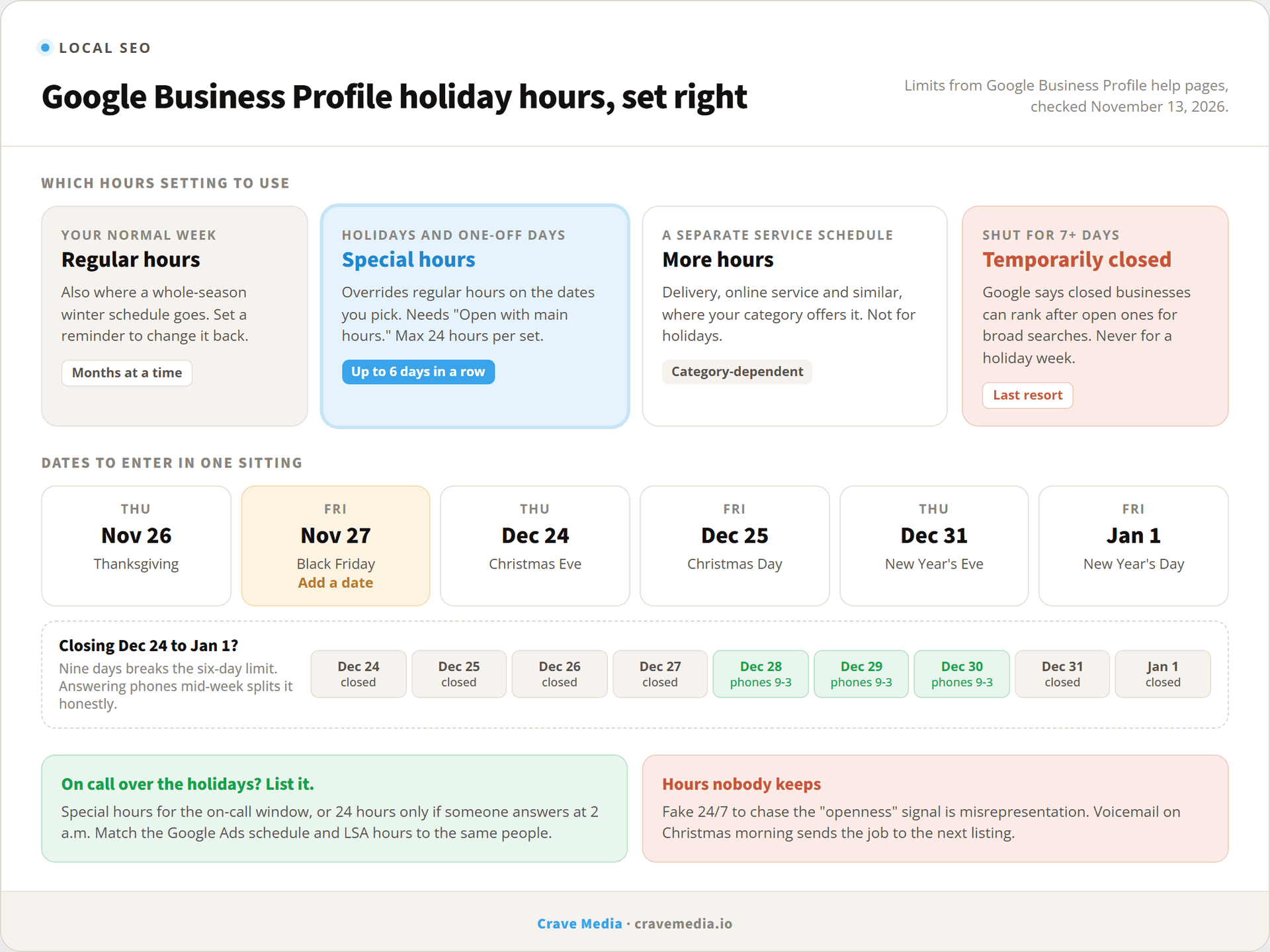
Regular hours are your normal week. Special hours are Google's term for date-specific exceptions, which is where holiday hours live. They override your regular schedule on the dates you pick and leave the regular schedule alone, so you don't have to remember to change anything back on December 26. "More hours" covers separate schedules for things like delivery or online service, if your category offers them. And "Temporarily closed" takes the whole business off the board.
Google's special hours help page sets a limit: special hours are for adjusted hours or closures of up to six days in a row. Longer than that, Google wants you on temporarily closed. Two other details from the same page trip people up. Special hours only show if your profile is set to "Open with main hours," and Google recommends confirming your hours for official holidays even when they're the same as usual.
That last one sounds like busywork until you see the label Google puts on profiles that skip it. More on that below.
Never use temporarily closed for a holiday week
If you close for Christmas week, set special hours for the days you're closed. Don't mark the business temporarily closed, even though it feels like the more honest button.
Google says it outright on its own help page. On marking your business closed, it states that "for broad queries, temporarily-closed businesses can rank after open businesses," with the effect depending on your category, the search, and how many competitors are also closed. A search for your business by name still finds you. A search for "furnace repair near me" on December 29 may not.
That lines up with something Google confirmed back in December 2023. Its Search Liaison account said Google had "long used 'openness' as part of our local ranking systems, and it recently became a stronger signal for non-navigational queries," while adding that it "might change" (Search Engine Journal covered it). So being closed costs you visibility in the moment, and temporarily closed tells Google you're closed at every hour of every day.
What we've seen on client profiles goes further, though it's our observation and Google hasn't published anything on it. A profile that sits on temporarily closed for a week doesn't always snap back to its old spot the morning it reopens. The bigger risk is simpler: someone forgets to flip it back, and the profile reads "Temporarily closed" into mid-January while the phones are on.
The six-day limit does force a decision if you shut down from Christmas Eve through New Year's Day, because that's nine days. Our fix is to look at whether you're really dark the whole time. If the office answers the phone and books January jobs on December 28, 29, and 30, you're open those days, so list them with the hours you'll be answering. That splits the break into two closures of four and two days, both inside the special hours rule. If the business really is locked up for nine straight days, Google's rule says temporarily closed, and you take the hit for a week. Don't post hours nobody is keeping to avoid it.
How to set holiday hours in Google Business Profile
You can do this from Google Search or the Maps app while signed in to the account that manages the profile.
- Search your business name on Google and choose Edit profile, then Hours.
- Find Special hours under business hours and select the edit icon.
- Google often lists upcoming holidays for you. Select Review on one to confirm it, or Add a date for any day that isn't on the list.
- For a day you're closed, leave Closed checked. For shorter hours, uncheck it and enter your open and close times.
- Save.
Two cases need extra steps. If you're open in two blocks on the same day (say 8 to noon, then on call from 5 to 9), use More, then Add hours to add the second block. And a single set of special hours can't run past 24 hours, so overnight coverage that starts on Christmas Eve and runs into Christmas afternoon has to be split into two sets, one per date.
Edits don't always appear the moment you save. Google can review changes before they go live, which is one more reason to do this in mid-November instead of the morning of.
Set the whole season in one sitting
Special hours can be added well ahead of time, so there's no reason to do Thanksgiving now and come back for Christmas. Enter every date through the new year today. For the 2026 season:
- Thanksgiving, Thursday, November 26
- Black Friday, November 27 (not an official holiday, so it may not show up as a suggestion; add it as a date if your hours change)
- Christmas Eve, Thursday, December 24
- Christmas Day, Friday, December 25
- New Year's Eve, Thursday, December 31
- New Year's Day, Friday, January 1, 2027
If Google also suggests Martin Luther King Jr. Day (January 18) or Presidents' Day (February 15) and you're open as usual, confirm them anyway. It takes ten seconds each.
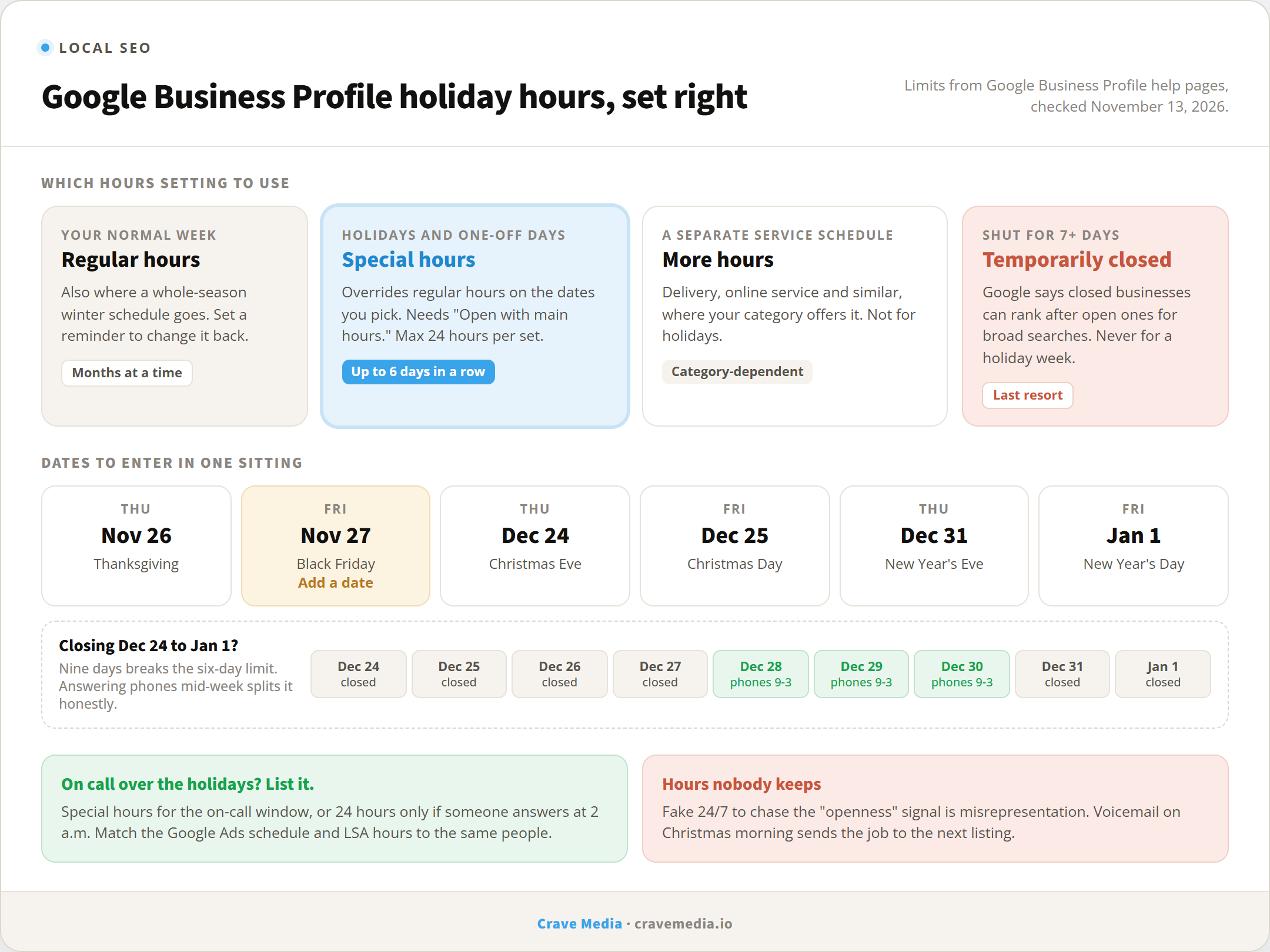
Which hours setting fits which closure, plus the 2026 to 2027 holiday dates worth entering in one sitting.
The "hours might differ" label
This part isn't on Google's help pages in so many words, so treat it as what local SEO practitioners report and what we've watched on client profiles. As a holiday gets close, a profile that hasn't confirmed hours for it can show a note warning that its hours might differ. It's Google hedging on your behalf, and it gives a searcher one more reason to call the competitor whose hours look certain.
Confirming the holiday, even with your normal hours, is what clears it. That's the practical reason behind Google's "confirm your hours for official holidays" advice. Many owners also get a "confirm your holiday hours" prompt in the profile dashboard or by email ahead of the big ones. Don't wait for it, since not every profile gets one.
One more check after the season ends. Google accepts suggested edits from users and sometimes updates fields on its own, hours included. Our guide to Google Business Profile posts and photos puts this in the monthly check, and the first week of January is a good time to run it early.
Winter hours for slow-season trades
A landscaper in Ogden who works four days a week from December through February doesn't have a holiday schedule. He has a winter schedule, and special hours can't hold it because of the six-day limit. Change the regular hours for the season, then put a reminder in your phone for the first of March to change them back. That reminder is the whole trick. Profiles showing "Mon to Thu, 9 to 3" in May lose spring calls to the business next door.
If you shut down completely for the off-season, Google's own guidance points to temporarily closed, and you'll rank behind open competitors for broad searches until you reopen. Most trades aren't really closed, though. If someone answers the phone and books spring estimates two mornings a week, list those two mornings. A short schedule that's true beats a closed sign, and it keeps the profile in front of the homeowners who plan their spring projects in February.
On-call and emergency businesses
For plumbers, restoration crews, locksmiths, and HVAC companies, the holidays are some of the most valuable days of the year. Pipes freeze on Christmas morning. Furnaces quit with a house full of relatives. If you're on call, say so on the profile. Set special hours that cover the on-call window, or leave 24 hours in place if someone is awake with the phone in hand.
The rule is the same one we gave for Google Ads for emergency services: the hours you advertise have to match the hours someone answers. That applies to the profile, the Google Ads schedule, and your Local Service Ads hours, and you shouldn't assume changing one changes the others, so check each before the 24th. When Google confirmed the openness signal, it also advised businesses against manipulating their hours to chase it. Listing 24/7 when nobody picks up at 2 a.m. is misrepresenting the business, and that's the kind of thing that gets profiles suspended. A suspended profile ranks nowhere, holiday or not.
If your on-call coverage is a tech's cell phone and a promise, list the hours that promise holds. The homeowner who gets voicemail at 7 a.m. on Christmas calls the next listing, and that company gets the next ten years of their furnace work.
Set the season before Thanksgiving week
Ten minutes this week covers every date through January 1, and then the customer who searches you at 4 p.m. on Black Friday sees hours you'll be there for. Leave it until Thanksgiving week and you're doing it from your phone at the in-laws', if you remember at all.
Hours are one of the fields we audit first, because a wrong one costs real customers, and the fix is free. If you want the rest of the profile checked too, the foundation is in how to set up a Google Business Profile that ranks, and upkeep is part of every local SEO campaign we run for businesses in Salt Lake City, Ogden, and beyond. Or request a free audit and we'll show you how your profile reads to a customer next to the competitors in your map pack, holiday hours included.

About the author
Zac Spencer is an online marketing specialist and the owner of Crave Media, based in Salt Lake City, Utah. Since 2013 he has managed hundreds of Google Ads accounts across dozens of industries — with budgets from a few hundred dollars to $250K a month — and run SEO for local businesses, ecommerce shops, and international franchises.