
SEO · September 25, 2026
Google Business Profile posts and photos, week by week

By Zac Spencer · Owner, Crave Media
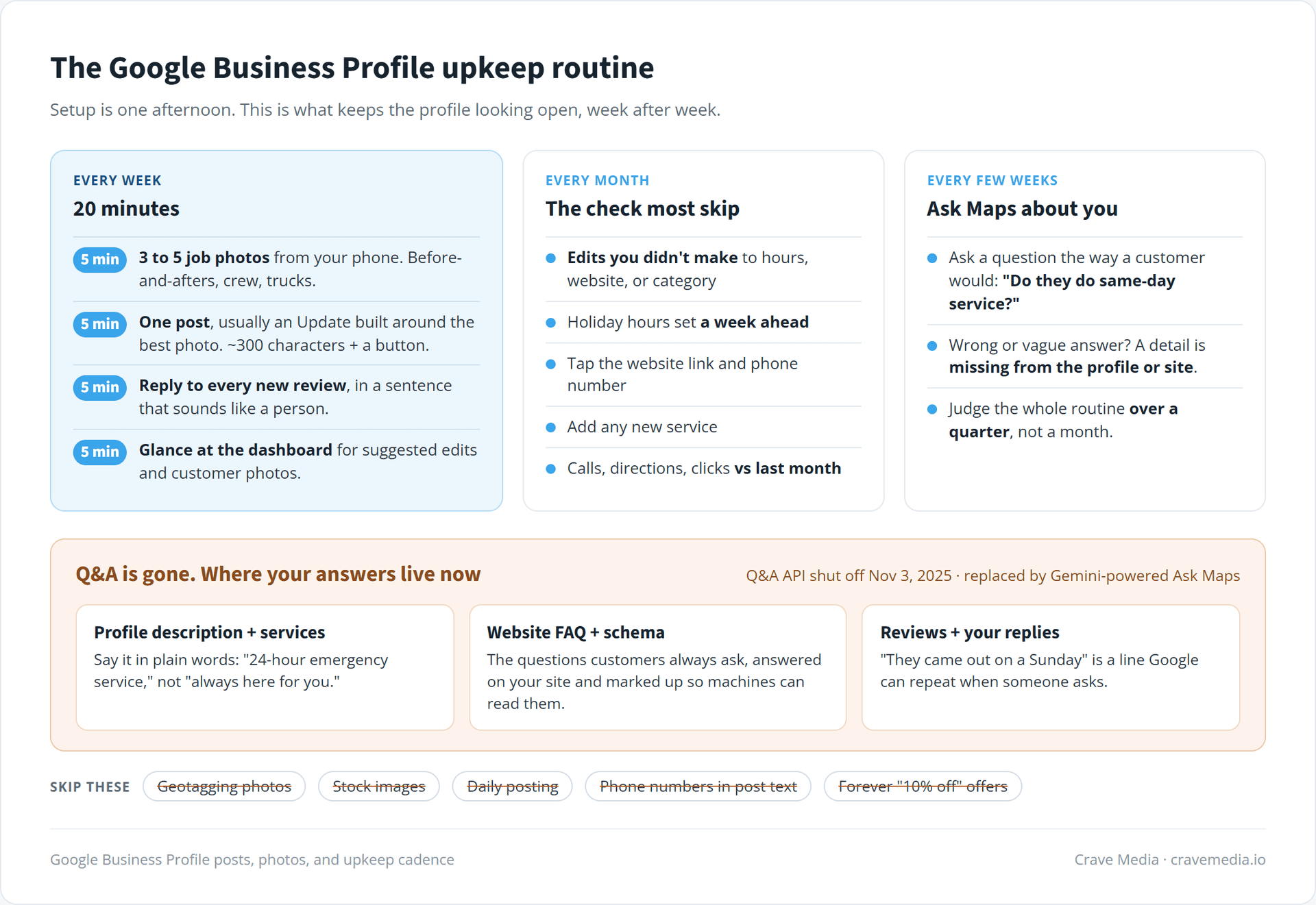
Setting up a Google Business Profile is a one-afternoon job. Keeping it alive is the part most businesses quit on. Somewhere around month three the posting stops, the newest photo is a truck you sold last spring, and the profile starts to look like a place that might be closed. Google Business Profile posts and photos are the two things you control week to week, and they're what separates a profile that looks open for business from one that looks abandoned.
This is the upkeep guide. If your profile isn't built out yet (categories, services, hours, the basics), start with how to set up a Google Business Profile that ranks and come back. Everything below assumes the foundation is in place and you're trying to keep it earning. It also covers the Q&A section, because if you haven't looked lately, it's mostly gone.
Why a finished profile still slips
Google wants to send searchers to businesses that are open and paying attention. It can't knock on your door, so it reads signals: new photos, recent posts, fresh reviews, owner replies. A profile where all of that stopped in March tells Google something. It tells the customer comparing you against two competitors the same thing.
The pattern in audits is familiar. Picture a roofer in Ogden with a solid profile, 90-some reviews and the right category, who goes quiet over a slow winter while a competitor with half the reviews posts job photos every week. By spring the competitor is the one in the map pack. The roofer didn't do anything wrong. He just stopped doing anything.
Nobody outside Google knows exactly how much posts and photos move rankings, and Google doesn't publish a weighting. What they do to the person looking at your listing is easier to see. Last week's job photos get a call. A logo and a stock image get scrolled past.
Google Business Profile posts that earn the space
Posts are short updates that show up on your profile, each with a photo and an optional button. Google currently offers three kinds: Updates, Offers (a deal with start and end dates), and Events. Most local service businesses should live in Updates. A furnace tune-up reminder in October, a before-and-after from a kitchen remodel in Sandy, a note that you've added a second crew and can book faster this month. Offers work if you have a real one. A fake "10% off" that runs forever reads as filler.
Posts older than six months get archived unless you set a date range, according to Google's own help docs. That's a change from the old days when posts vanished after a week, and it means a single post doesn't have to carry much. It also means a profile whose newest post is five months old is showing that date to everyone.
Google gives you 1,500 characters per post. Use about 300. Two or three sentences that say what happened and where, a real photo from the job (a horizontal shot around 4:3 crops cleanly), and a "Call now" or "Book" button. Leave the phone number out of the text itself. Google may reject a post when it can't tie the number to your business, and the button already does that job.
One post a week is a good pace. Every other week is fine. Daily posting is wasted effort for a plumber, and we'd rather you spend that time on photos.
Photos do the heavier lifting
If you only have fifteen minutes a week for your profile, spend them on photos and review replies, not posts. That's our honest ranking of the three. Photos show up in more places (the profile, image results, Maps, and now the AI answers Google generates about your business), and customers look at them before they read a word.
The photos that work are the ones a stranger can't fake. Before-and-after pairs shot from the same angle are the best of them. After that, your crew in uniform on a real site, and your trucks, which quietly prove you exist. If customers ever come to you, add the shop entrance so they can find the door.
Stock photos do nothing. Neither does your logo uploaded six times, or a flyer covered in text.
Take the photos on the job with your phone. Three to five a week is plenty, and a tech who snaps two shots before leaving each site will out-supply any photo shoot you could book.
You may hear that you should geotag your photos before uploading so Google knows where they were taken. Skip it. Google strips that location data from uploaded images, so the tagging does nothing. The location signal comes from what's in the photo and the steady fact that you keep adding them.
Also look at the photos customers upload. You can't delete a customer photo just because you don't like it, but you can report ones that are off-topic or inappropriate. A blurry shot of your parking lot shouldn't be the first image people see if your own work photos can bury it.
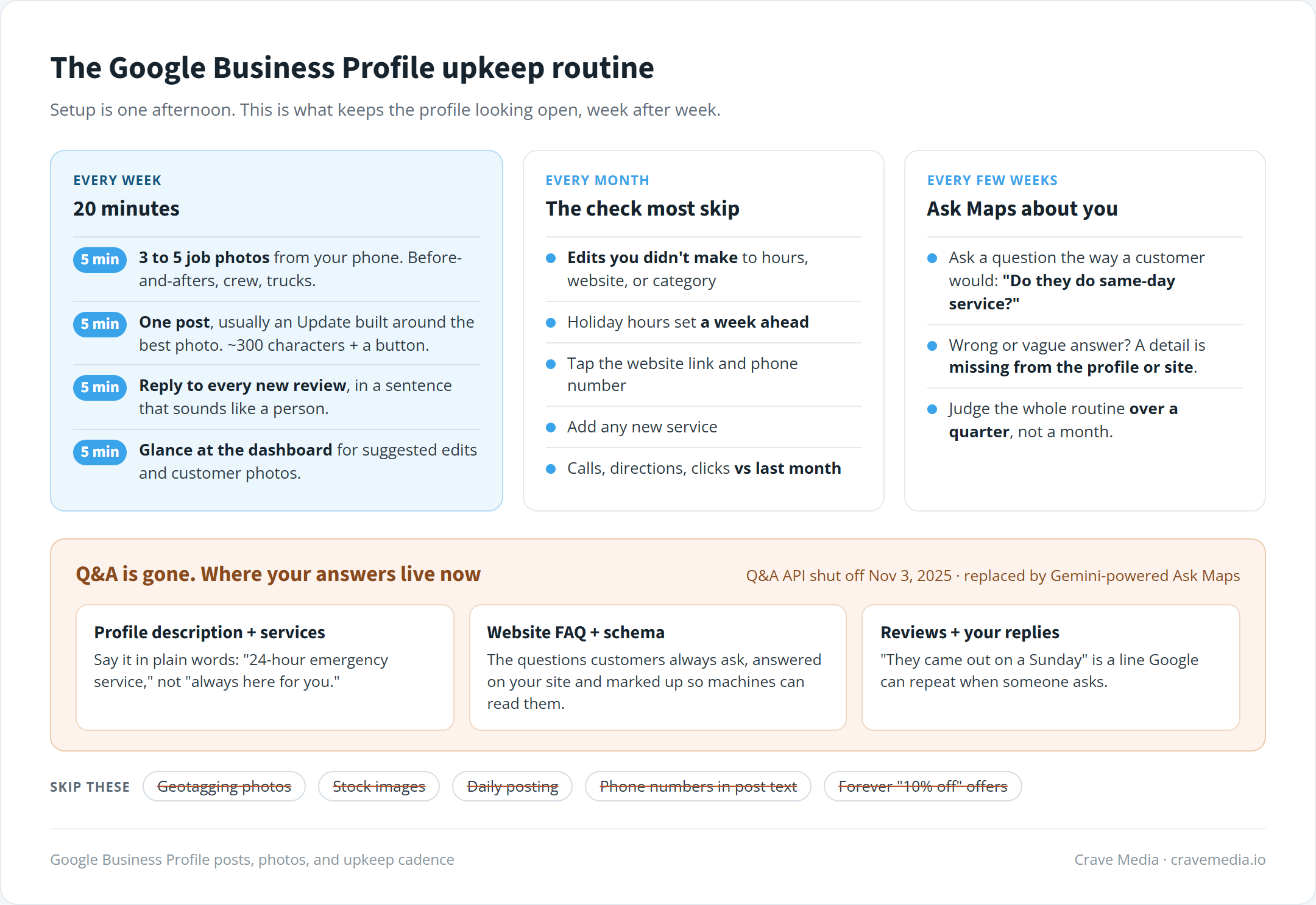
The upkeep cadence we run for local clients. Weekly posts and photos, a monthly check, and the places your answers need to live now that Q&A is gone.
What happened to Google Business Profile Q&A
The Questions and Answers section is on its way out. Google shut off the Q&A API on November 3, 2025, and the public section has been disappearing from listings in waves since. New profiles don't get it. If yours still shows old questions, they're frozen: nobody can add new ones, and you can't answer the old ones.
In its place is Ask Maps, a Gemini-powered feature where a customer asks about a place and gets an AI-written answer. Google builds that answer from your profile fields, reviews, photos, and website. It has rolled out in stages and still varies by device and country, so what your customers see may not match what you see on your own phone.
This one stings a little. Seeding your own Q&A with the questions customers always ask was one of the better cheap tricks in local SEO, and it's over. Those answers now have to live somewhere Google reads. Put them in the profile description and services list in plain words ("24-hour emergency service," not "always here for you"). Put them on your website, ideally in an FAQ section marked up with schema for local businesses so machines can parse it. And let your reviews carry some of it, because when a customer writes "they came out on a Sunday," Google can repeat that.
Every few weeks, ask Google Maps a question about your own business the way a customer would. "Do they do same-day service?" "Do they work in Layton?" If the answer comes back wrong or mushy, the fix is almost always a detail missing from the profile or the site. Our sister site Crave Media AI goes deeper on how AI search is reshaping local marketing.
Reviews and replies belong in the routine
Reviews get their own guide, how to get more Google reviews without breaking the rules, so we'll keep this short. For upkeep purposes, the job is replying. Answer every new review within a few days, good and bad, in a sentence or two that sounds like a person.
Replies do double duty now. They show the next customer that someone's watching, and they're text Google can read when it builds an answer about you. "Thanks, glad we could get your AC running the same afternoon" says something useful. "Thank you for your business!" pasted thirty times says nothing.
The monthly check most people skip
Once a month, open your profile and look for edits you didn't make. Google accepts suggested changes from users and sometimes updates fields on its own, like hours, the website link, or even your category. A lot of owners find out months later when a customer mentions you were "listed as closed." The dashboard flags these, but only if you look.
While you're in there, set special hours for the next holiday a week ahead instead of the morning of, tap the website link and phone number to make sure both still work, and add any service you've started offering.
Then open the performance tab and compare calls, direction requests, and website clicks against last month. That's the scoreboard. A single month bounces around, so judge the upkeep over a quarter.
A 20-minute weekly routine
Sized for a busy owner or an office manager:
- Upload three to five photos from this week's jobs (5 minutes)
- Publish one post, usually an Update built around the best photo (5 minutes)
- Reply to every new review (5 minutes)
- Glance at the dashboard for suggested edits or customer photos worth reporting (5 minutes)
Add the monthly check and the occasional ask-Maps test, and that's the full maintenance load. None of it is hard. The reason most profiles decay is that it's easy to skip for one week, and one week turns into a season.
Keep the lights on
A profile's real job is to look open to someone who's never heard of you, at 7 p.m. on a Tuesday, with two competitors one tap away. Last week's photos and a reply from the owner do that. A photo of a truck you sold doesn't, however good the reviews are.
If you'd rather hand it off, profile upkeep is part of every local SEO campaign we run for businesses in Salt Lake City, Ogden, and beyond. Or start with a free audit and we'll show you how your profile looks next to the competitors taking your map pack spot, and what we'd fix first.

About the author
Zac Spencer is an online marketing specialist and the owner of Crave Media, based in Salt Lake City, Utah. Since 2013 he has managed hundreds of Google Ads accounts across dozens of industries — with budgets from a few hundred dollars to $250K a month — and run SEO for local businesses, ecommerce shops, and international franchises.