
Google Ads · October 13, 2026
Negative keywords every local service business needs

By Zac Spencer · Owner, Crave Media
Open the search terms report on almost any local Google Ads account that's run a few months without supervision and you'll find the same visitors. Someone looking for an HVAC apprenticeship. Someone who wants to know how to snake a drain with a coat hanger. Someone searching for a roofer three hundred miles outside your service area. Each one clicked your ad, and each click cost you the same as a homeowner with a leaking ceiling.
Negative keywords in Google Ads are how you stop paying for those people. You tell Google which words should keep your ad from showing, and it obeys. It's the least glamorous setting in the account. In the local accounts we audit, it's also the one most likely to be half-empty, or empty.
Below are five starter lists most home-service businesses can load on day one, plus a few words we'd tell you not to block, even though most copy-paste lists online include them. First, though, the matching rules, because negatives don't behave like your regular keywords.
How negative keywords match
Regular keywords in Google Ads are generous. A broad match keyword like "water heater repair" can show your ad for "fix hot water tank," because Google expands it to searches it considers related.
Negatives get no such help. Google's own documentation says it plainly: negative keywords "won't match to close variants or other expansions." Block "job" and you haven't blocked "jobs." Block "plumber training" and "plumbing school" walks right through. That's the single most common reason a negative list looks complete and still leaks. If a word has a plural, a common misspelling, or an obvious synonym, add those yourself.
There are three negative match types. A broad negative like apprentice (the default) blocks any search containing all of its words, in any order. A phrase negative like "how to" blocks searches with those words in that order, whatever comes before or after. An exact negative like [plumber salary] blocks that precise search and nothing else.
For a starter list, single-word broad negatives do most of the work. Phrase and exact are for words that are junk in one phrase and a buyer in another. You'll hit one of those in the free-and-cheap list below.
Five starter lists for local service businesses
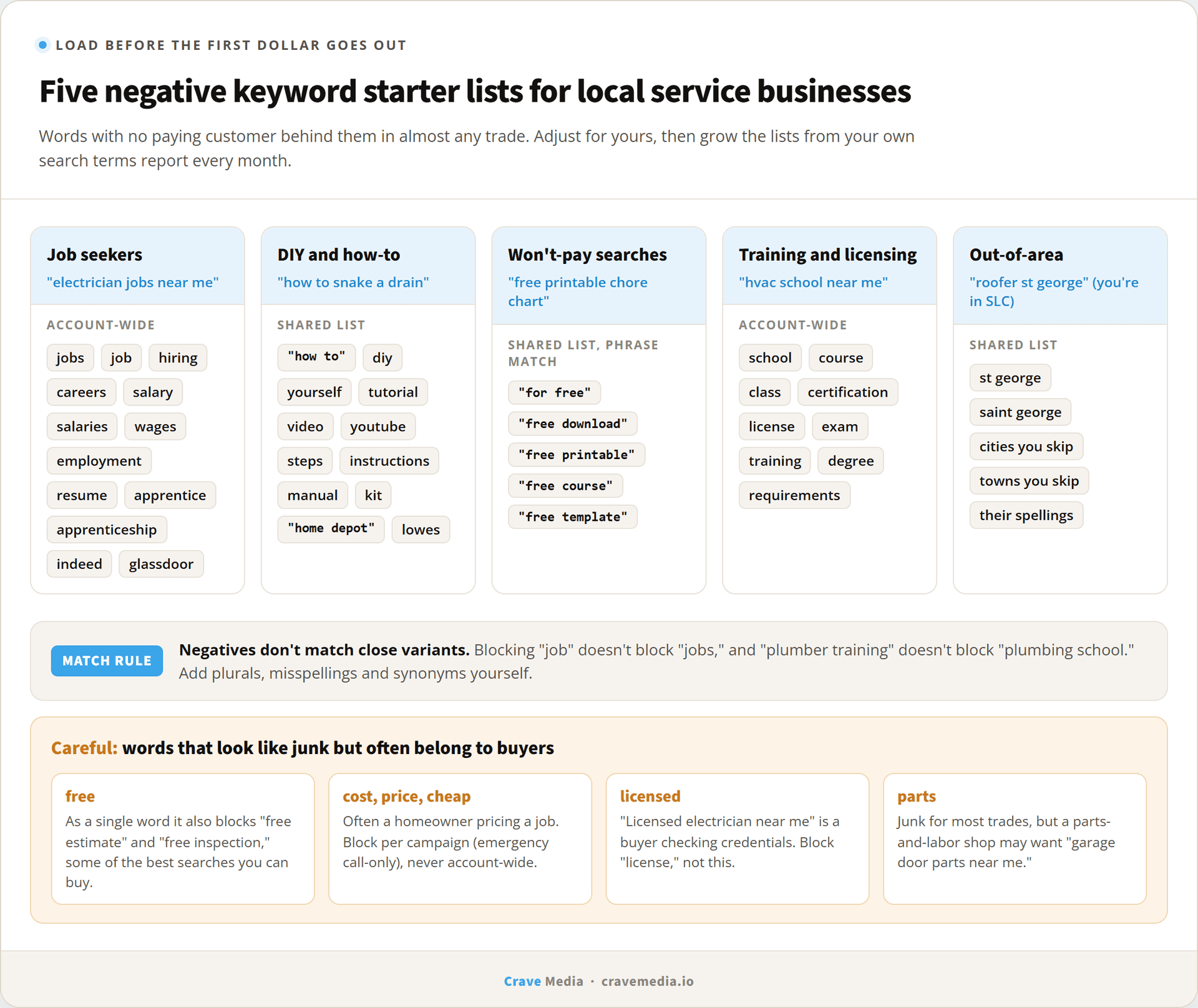
These are the lists we load on a new home-service account before the first dollar goes out. Adjust them for your trade, but most of these words have no paying customer behind them in any trade.
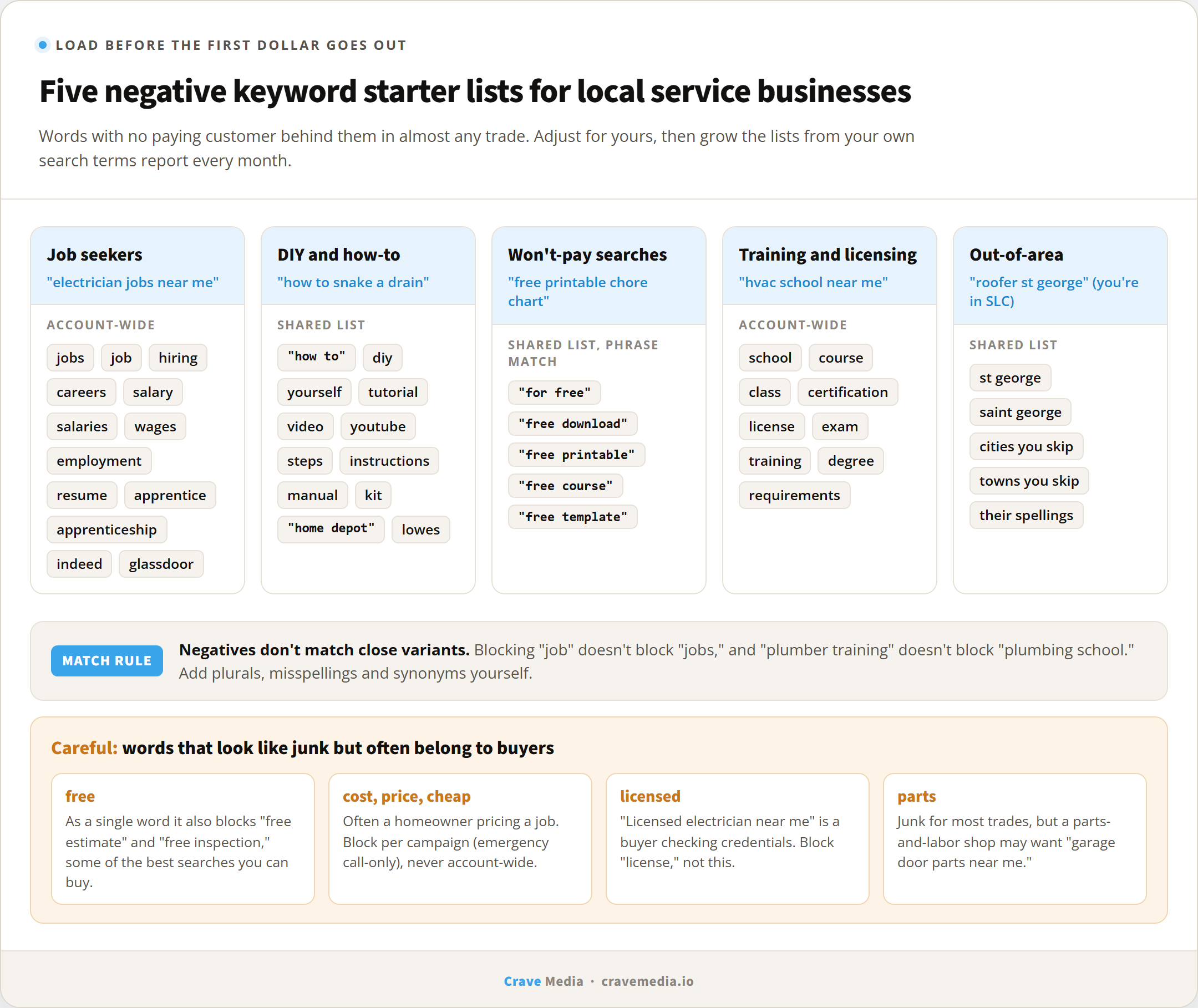
Five starter negative keyword lists, plus the words that look like junk but often aren't.
Job seekers
The biggest leak in most trade accounts. Anyone searching "electrician near me" might be a homeowner, and anyone searching "electrician jobs near me" is not. Load these on day one:
jobs, job, hiring, careers, career, salary, salaries, wage, wages, employment, resume, apprentice, apprenticeship, indeed, glassdoor
DIY and how-to
These searchers want to do it themselves, and good for them. They just shouldn't do it on your budget. "How to," "diy," "yourself," "tutorial," "video," "youtube," "steps," "instructions," "manual," "parts," "kit," "home depot," "lowes."
Be careful with "parts" if you sell them. A garage door company that does parts-and-labor jobs may want "garage door parts near me" traffic, and that's a call only you can make.
Free and cheap
This is where most of the lists floating around online get it wrong. "Free" looks like an obvious negative, and if you add it as a broad negative it will also block "free estimate roof repair" and "free inspection termites." Those are some of the best searches a local business can buy. The person typing them is ready to have someone come out.
So skip the single word. Block the phrases that mean "I won't pay": "for free," "free download," "free printable," "free course," "free template." Then watch your search terms and add more as they show up.
"Cheap" and "cost" deserve the same caution. In a standard search campaign, "water heater replacement cost Ogden" is often a homeowner pricing a job they're about to book. In an emergency call-only campaign it's a researcher, which is why our post on Google Ads for emergency services blocks cost terms there. Our position: never negate "cost," "price," or "cheap" account-wide. Decide campaign by campaign, from your own search terms.
Training and licensing
Mostly people who want to become you, typing things like "hvac school," "plumbing license exam," or "pest control certification online." The words to block are school, course, class, certification, license, exam, training, degree, and requirements. Leave "licensed" alone; "licensed electrician near me" is a buyer checking credentials. If you run your own apprenticeship and want those applicants, fine, run a separate recruiting campaign. Don't let them spend your lead budget.
Out-of-area cities
Location targeting decides where the searcher is. It doesn't decide what town they typed. A homeowner in Ogden searching "roofer Provo" for a parent's house is inside your targeting and outside your service area. Add the names of cities and towns you don't serve, especially the big ones nearby that people search for by name. For a Salt Lake City business that won't drive to St. George, "st george" goes on the list, along with "saint george" since close variants don't count.
One related setting is worth a look while you're there. Google's default location option is "presence or interest," which can show your ads to people outside your area who've shown interest in it. For most local service businesses, "presence" (people in or regularly in your area) is the safer choice, and negatives can't fix that one for you.
Where to put negative keywords
Google gives you three places, and the choice matters less than people make it sound.
Account-level negatives apply across the whole account, up to 1,000 terms, per Google's help docs. Shared negative keyword lists sit in the Shared Library; you can build up to 20 per account with up to 5,000 terms each and attach them to any campaign. Campaign-level negatives apply to one campaign only.
Our setup for most local accounts: the job-seeker and training lists go account-wide, because those words are never a customer. DIY, out-of-area, and the "free" phrases go in shared lists attached to the campaigns that need them. Anything campaign-specific, like cost terms in an emergency campaign, stays at the campaign level.
If you run Performance Max, 2025 changed things. Campaign-level negatives opened to all PMax advertisers in January, the cap jumped from 100 to 10,000 per campaign in March, and shared negative lists could attach to PMax campaigns by later in the year. For most of PMax's first four years none of that was available, and plenty of PMax accounts still carry no negatives at all because they were built before the change. If yours is one of them, it's worth an afternoon.
Smart campaigns are the exception. They get "negative keyword themes" instead, with no match types and no shared lists, and you can only judge them against a summarized search terms view. That gap is a big part of why we steer growing budgets out of Smart mode in Smart campaigns vs full Google Ads.
The search terms habit
No starter list catches everything. Your market has its own junk. A pest control account might find a run of "pest control for chickens" searches. A cleaning company might find people looking for cleaning products. You only learn these from the search terms report, which shows the actual searches that triggered your ads and what each one cost.
For the first month of a new campaign, read it weekly. After that, monthly is usually enough. Sort by cost, highest first, and ask one question of each row: could this person have hired us? If no, add the offending word as a negative. If maybe, leave it and check again next month. It takes about ten minutes, and we explain what else to look for in how to read a Google Ads report.
There's a limit to what you'll see. Google groups low-volume searches into a single "other search terms" line and doesn't show them, citing privacy thresholds. Third-party analyses disagree on how much spend lands there, but the estimates aren't small, and broad match campaigns tend to hide more. That's another reason to load the starter lists up front: they block junk you would never get to see.
Two mistakes to watch for while you're in there. First, a negative can block one of your own keywords. Google usually flags these conflicts, so check the notifications. Second, and harder to spot, a negative can block good searches that aren't keywords yet. That's the "free estimate" problem. If leads drop right after a cleanup, look at what you added before you look anywhere else.
Every no keeps paying
Most Google Ads changes help for a while and then fade. A new ad gets stale, a bid change gets undone by the next auction shift. A negative keyword doesn't fade. Block "jobs" in March and it's still saving money in December, on every search, without anyone touching it.
That's why we start every new Google Ads account with these lists and why we keep adding to them every month after. If you've never looked at your search terms, or you're not sure anyone managing your account has, send us the login. We'll pull the report, show you what you've been paying for, and give you a starter list built for your trade, free.

About the author
Zac Spencer is an online marketing specialist and the owner of Crave Media, based in Salt Lake City, Utah. Since 2013 he has managed hundreds of Google Ads accounts across dozens of industries — with budgets from a few hundred dollars to $250K a month — and run SEO for local businesses, ecommerce shops, and international franchises.