
Google Ads · September 22, 2026
Smart campaigns vs full Google Ads, the honest difference

By Zac Spencer · Owner, Crave Media
A good share of the Google Ads accounts we audit turn out not to be regular Google Ads accounts at all. They're Smart campaigns, and the owner usually doesn't know. They signed up years ago, clicked the path Google laid out, picked a budget, and ads started running. Money leaves every month. Some calls come in. Whether those two facts are related is anyone's guess, because the account doesn't have the reporting to say.
If that's roughly your setup, this post is the comparison worth reading before you decide anything: what a Smart campaign is, what it quietly takes off the table, when it's genuinely the right call, and what changes when you move to a full account.
What a Smart campaign is
Smart campaigns are Google's simplified ad product, the descendant of what used to be called AdWords Express. Setup takes about ten minutes. You write a short ad, pick a handful of "keyword themes" like "plumber" or "drain cleaning," set a monthly budget, and hand the rest to Google. Bidding is automated, placement is automated, and your ads can show across search results, Maps, partner sites, and Google's display network as the system sees fit.
Google pushes small businesses toward this product hard. It's the default path when you click "advertise" from a Business Profile, and the pitch is fair as far as it goes: no learning curve, no keyword research, nothing to manage.
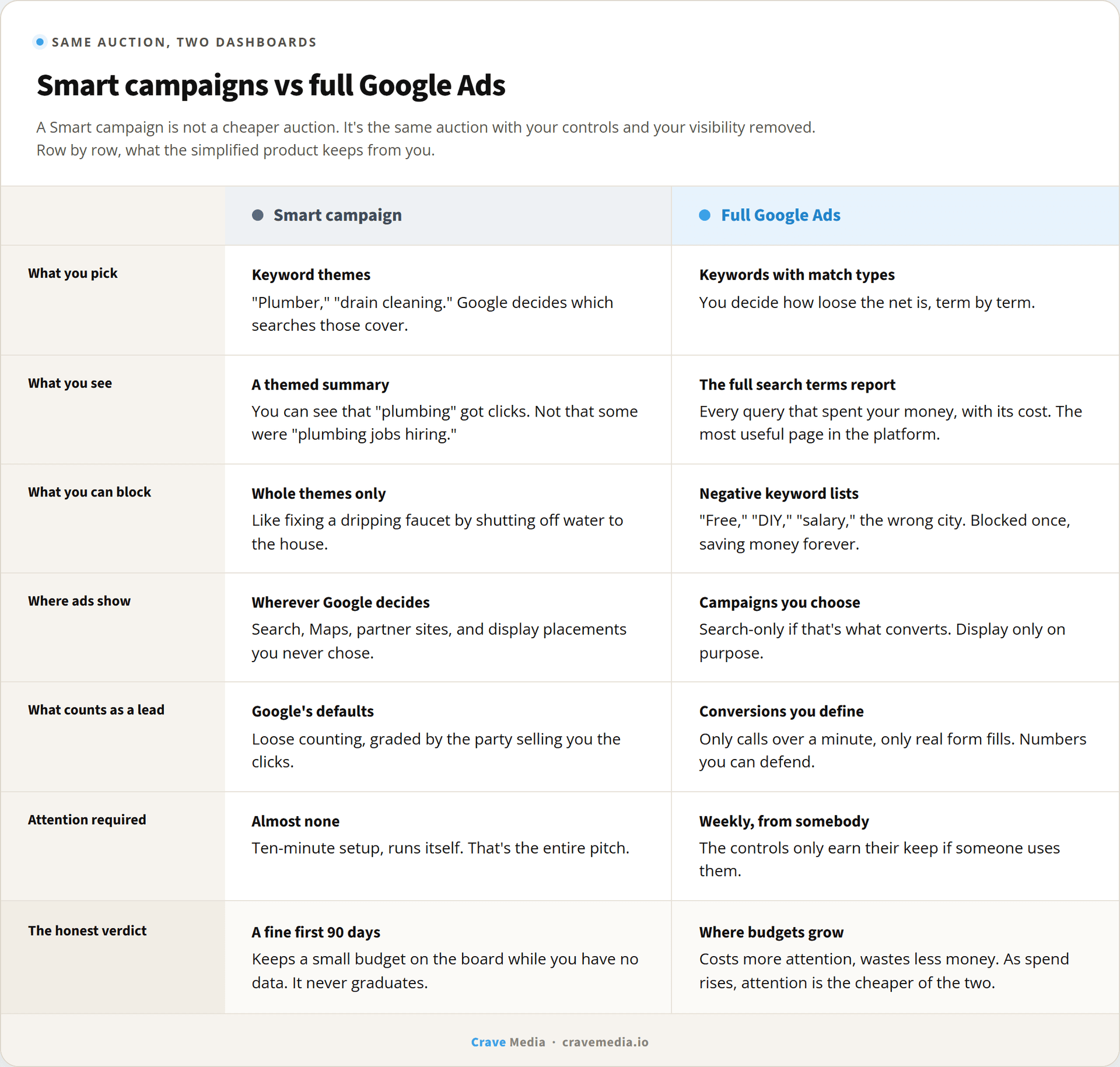
The catch is what the word "simplified" is doing. A Smart campaign isn't a different, cheaper auction for small businesses. Your ads compete in the same auction as everyone else's, at prices set the same way. What's been simplified is your side of the dashboard. It's full Google Ads with most of the controls and most of the visibility removed.
What you give up
Three losses do most of the damage.
The first is seeing what you're paying for. A full Google Ads account has a search terms report, the literal list of what people typed before clicking your ad and what each click cost. We call it the most useful page in the whole platform in our guide to reading a Google Ads report, because it's where the waste hides in plain sight. A Smart campaign gives you a summarized version grouped into themes. You can see that "plumbing" got clicks. You mostly can't see that a chunk of them were "plumbing jobs hiring near me."
The second is the power to say no. Full accounts run negative keyword lists: terms you never want to pay for, like "free," "DIY," "salary," or the name of a city you don't serve. Smart campaigns don't give you that scalpel. You can remove an entire keyword theme, which is like fixing a dripping faucet by shutting off water to the house. So the junk clicks you can't see are also junk clicks you can't block, and that pairing is the real cost of the product. On a $500 budget in a market where clicks run $15, a few bad clicks a week is a meaningful slice of the month.
The third is knowing what counts as a lead. A full account lets you define conversions precisely, down to counting only phone calls over a minute, which is the setup behind any number you can trust. One client's account we manage has logged 1,740 conversions at a 13.46% conversion rate, and we can defend both figures because we decided exactly what gets counted. Smart campaigns lean on Google's loose defaults, and Google grades its own homework generously.
The same auction, two very different dashboards. The right column is what you get back when you leave Smart mode.
When a Smart campaign is the right call
An honest comparison has to include this part, because the answer isn't "never."
If your budget is a few hundred dollars a month, nobody in your business has two hours a week for ad management, and you'd otherwise run nothing at all, a Smart campaign is defensible. It keeps you on the board. A plumber whose phone rings twice more a month because of a Smart campaign is ahead of the plumber who spent nothing and got nothing, and there are markets small enough that this is a fine steady state.
And a full account run badly loses to a Smart campaign run by Google. We've audited hand-built accounts with no negative keywords, broad match everything, and conversion tracking counting page views as leads. Google's automation at least optimizes toward something. A neglected full account optimizes toward nothing. The controls only earn their keep if somebody uses them.
Our actual position: a Smart campaign is a reasonable first ninety days and a bad second year. It gets you into the auction while you have no data. But it never graduates. Twelve months in, you have spent thousands of dollars generating information about what works in your market, and the product has kept nearly all of it from you.
What changes when you switch
Moving to a full search campaign isn't an exotic migration. The pieces that matter show up in the first month.
The search terms report starts filling up, and the first read-through is usually worth the whole switch. You find the hiring searches, the DIY searches, the wrong-city searches, and every one becomes a negative keyword doing quiet work for as long as the account runs. Keywords replace themes, with match types that let you decide how loose the net is. Ads stop defaulting onto display placements that mostly buy accidental thumb taps. And conversion tracking gets rebuilt around your definition of a lead, ideally with call tracking so a sixty-second phone call counts and a wrong number doesn't.
None of this is free. Somebody has to check the account weekly, and whether that's you or someone you hire, the management effort is real. That's the trade in one sentence: Smart campaigns cost less attention, full accounts waste less money. As budgets grow, attention gets cheaper than waste. If you're still weighing where ad dollars fit against organic in the first place, we walked that broader decision through in Google Ads vs SEO.
How to check what you're running
Log into ads.google.com and look at the campaign list. Smart campaigns are labeled "Smart" right in the campaign type column. If you see it, look at one more thing: last month's spend, next to however many leads you can actually name from it.
If you can't connect those numbers, that's the product working as designed. Send us the login and we'll audit it free, show you what the campaign has been buying, and tell you straight whether Smart mode is serving you fine or quietly rounding your budget down. Training wheels are great until you notice they're also doing the steering.

About the author
Zac Spencer is an online marketing specialist and the owner of Crave Media, based in Salt Lake City, Utah. Since 2013 he has managed hundreds of Google Ads accounts across dozens of industries — with budgets from a few hundred dollars to $250K a month — and run SEO for local businesses, ecommerce shops, and international franchises.