
Strategy · November 6, 2026
A year-end marketing review for local service businesses

By Zac Spencer · Owner, Crave Media
Ask the owner of a plumbing company in Ogden which marketing worked this year and you'll usually get a confident answer. Ask how many booked jobs each channel produced, and what each one cost, and the room gets quiet. Most of the year's marketing decisions were made on a feeling, a sales rep's slide, or whichever phone line seemed busiest in July.
A year-end marketing review fixes that, and November or December is the right time to do it. The busy season is over for most trades, the year's numbers are nearly complete, and nothing for next year has been signed yet. It takes an afternoon or two. You end up with one page that shows every channel side by side, judged on the same number.
This post is the look back. Setting next year's total comes after, and we covered that separately in how to set next year's marketing budget. The review is what makes that number honest.
Pull the numbers before they age out
Start by collecting the raw data, and do it soon. Some of it doesn't wait for you.
Google Analytics 4 is the one that catches people. Its standard reports keep your history, but explorations and funnel reports only reach back as far as the property's data retention setting, and that's two months on a lot of accounts. You can raise it to 14 months under Admin, then Data settings, then Data retention, but the change only applies going forward. Data that already aged out is gone. If you've never touched that setting, change it today, even if the rest of the review waits until December.
Google Business Profile's performance screen only covers a limited recent window, so export or screenshot the calls, website clicks, and direction requests for the months it shows. Google Ads and Local Service Ads keep their history, which makes them the easy part.
What you need, for each channel, for the full year:
- Total spend, including fees, software, and anything you paid someone to manage it
- Leads: calls, forms, texts, and LSA leads you were charged for
- Booked jobs that came from those leads
- Revenue from those jobs, if your field software can tie it back
Put it in one spreadsheet, one row per channel. Include the things you don't think of as channels, like the truck wraps, the home show booth, and the directory listing someone renewed in March.
Match leads to booked jobs
This is the hard part of any annual marketing review, and the part most owners skip. Counting leads is easy because every platform hands you that number. Counting the jobs those leads turned into means connecting your marketing data to your scheduling or invoicing software, and the platforms have no interest in doing that for you.
If you have a separate tracking number on each channel, you're in good shape. Pull the call log, match the caller numbers against your customer list for the year, and you have booked jobs by channel. We walked through that setup in how to track which marketing brings in calls.
Without tracking numbers you're estimating, and you should say so on the sheet. The "how did you hear about us" field in your CRM is better than nothing, but customers misremember constantly. Plenty of people who found you on Google will say "a friend" because a friend mentioned you once, two years ago. Treat those answers as a rough split and nothing more precise.
A middle path we use often: pick 50 booked jobs from across the year, look each one up in your call tracking, Ads, and LSA dashboards, and see where it came from. Fifty is enough to see the shape. It won't be exact, but it's a lot closer than guessing.
The other number to pull while you're in the call log is missed calls. Count how many calls went to voicemail during business hours, and how many came in after hours with nobody answering. A channel with a poor book rate sometimes just has nobody picking up when it rings.
Cost per booked job is the number to judge
Once you have spend and booked jobs per row, divide. That's cost per booked job, and it's the only number in this review that lets you compare a Google Ads campaign to a truck wrap on fair terms.
Cost per lead still belongs on the sheet. It tells you how efficiently a channel makes the phone ring. But a cheap lead that never books is the most expensive kind there is, because someone on your team spent time on it. If you want a sense of what's normal, our cost per lead benchmarks give rough ranges by channel, though your own book rate matters more than any benchmark.
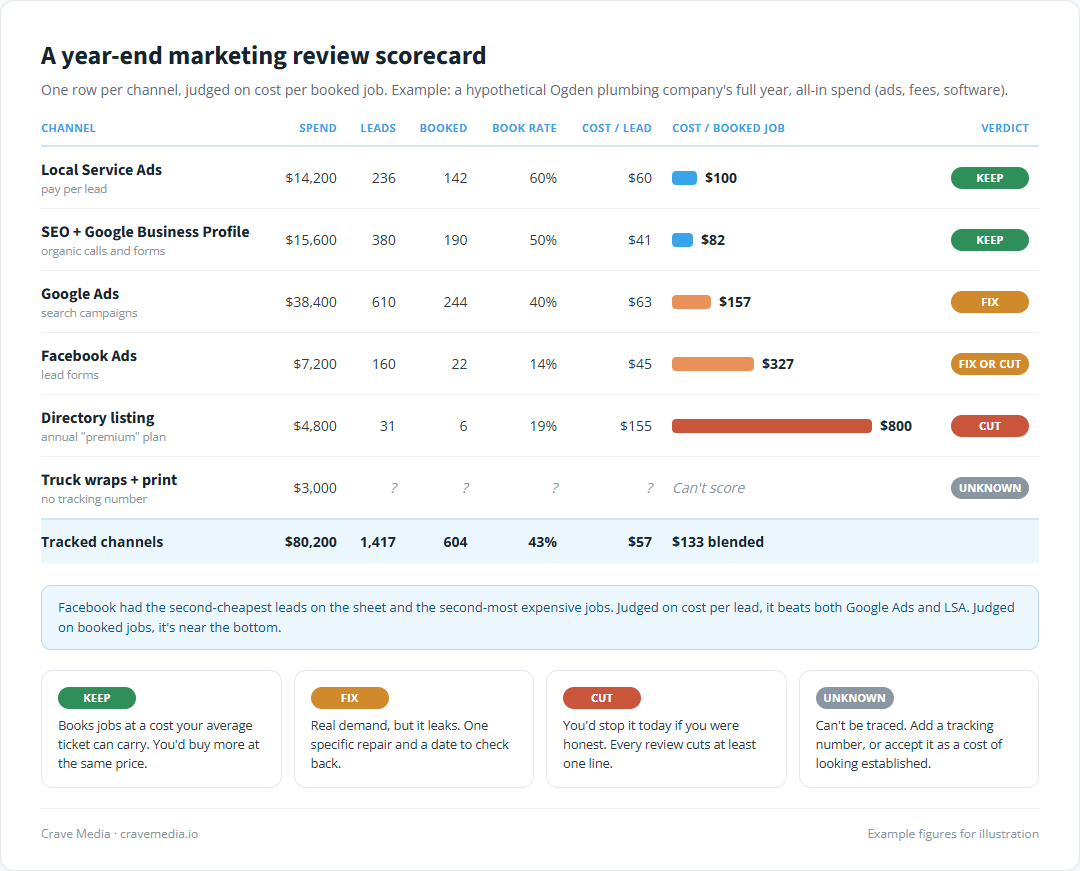
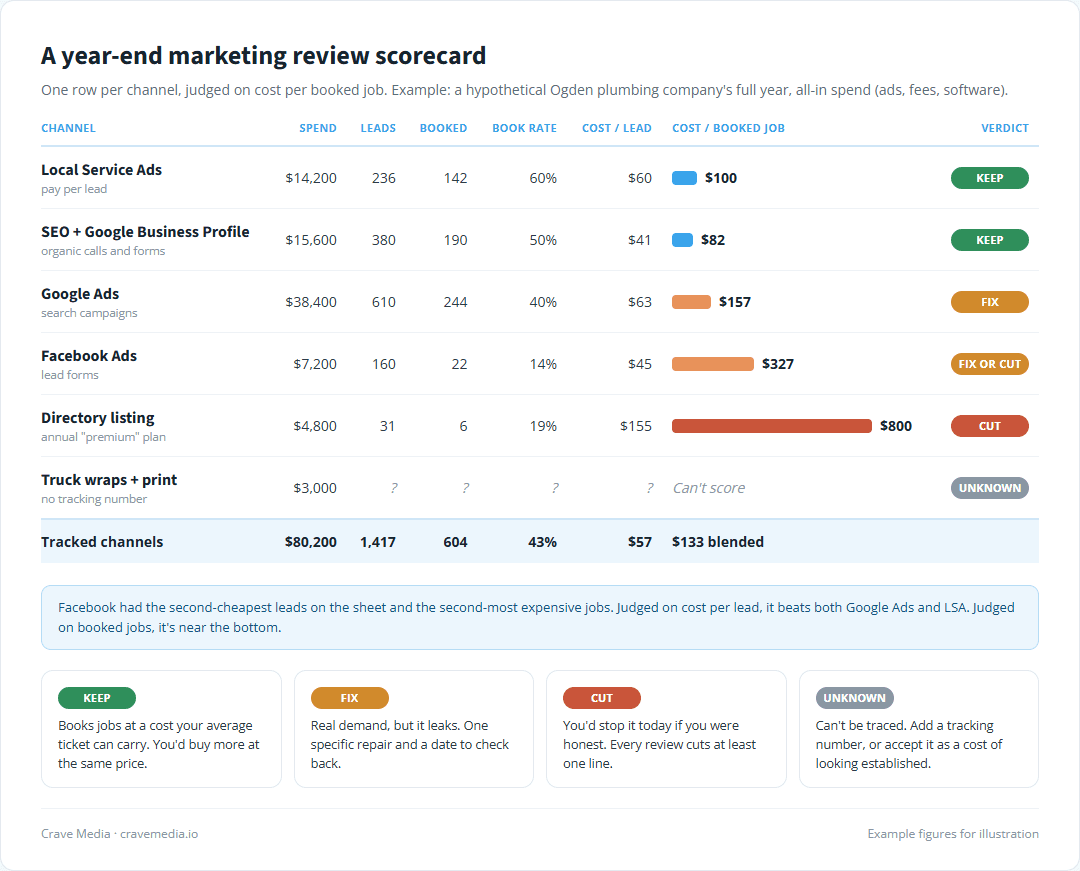
A sample year-end marketing review scorecard. Some of the cheapest leads on the sheet turned into some of the most expensive jobs.
Take the example on the scorecard, a hypothetical Ogden plumbing company. Facebook produced leads at $45 each, cheaper than Google Ads. Only 22 of its 160 leads booked, so each Facebook job cost about $327. Local Service Ads cost a little more per lead and booked 60 percent of them, landing at $100 a job. On a cost-per-lead report, Facebook beats both paid search channels. On the review, it's near the bottom.
We'd mark that one fix or cut. Lead forms tend to collect people who tap submit without much thought, so the usual repair is a form that asks a harder question or two, or moving the money to ads aimed at past customers. If neither brings the cost per job down by spring, it goes.
Sort every channel into keep, fix, or cut
With cost per booked job in hand, each row gets one verdict. Write it on the sheet next to the number, with a sentence about why.
Keep means the channel books jobs at a cost your average ticket can carry, and you'd buy more of it at the same price. In the example, LSA and SEO both land there. SEO gets judged on a longer clock than the paid channels, since it builds over years, so compare organic calls in the first half of the year to the second. The annual total hides the trend, and the trend is what you're paying for.
Fix means the channel brings in real demand but leaks somewhere. Google Ads at $157 a job might be paying for searches like "plumbing apprenticeship" or reaching people who live two hours away. You don't cut a fix channel. You give it one specific repair and a date to check back. If you're not sure where an ad account leaks, reading the Google Ads report itself is the place to start.
Cut means you'd stop it today if you were honest. The $4,800 directory listing that booked six jobs at $800 each is the classic one. So is the radio spot nobody can trace and the "premium placement" upsell you don't remember agreeing to.
Then there's the row you can't score, usually wraps, signs, and sponsorships. Don't pretend to know. Mark it unknown and decide whether it's worth a tracking number or a dedicated landing page next year, or whether you're comfortable paying for it as a cost of looking like a real company. A clean truck in a Layton driveway does something. You just can't put a number on it.
Our rule: every year-end review cuts at least one thing. If every row really earned a keep, cut the weakest one anyway. A review that ends with everything on "keep" usually means the bar was set too low, and the money from that cut is what pays for next year's test.
What the numbers miss
A spreadsheet only sees what it was given, and the biggest thing it can't see is the work your marketing doesn't have to do. If referrals and repeat customers make up half your jobs, every paid channel is competing for the other half, and a modest cost per job might be fine. If repeat business slipped this year, look there before you blame any ad channel. Those customers already knew you. Losing them usually traces back to a maintenance plan nobody renewed, and no amount of LSA spend replaces them at the same cost.
Brand search muddies the credit too. A neighbor sees your truck, types your company name into Google a week later, and the call shows up under Ads or organic. If branded searches climbed this year, something upstream earned it.
And check the calendar before condemning a channel for a bad July. If the schedule was full three weeks out, a low book rate that month says more about your crew than your ads.
Decide what to add
The review usually points at one obvious addition, and it's often a channel that's already working with room to grow, like raising the LSA budget or adding service-area pages to a site that's getting organic calls from only two towns. Occasionally it's something new. Either way, pick one, write down why the review supports it, and set a cost-per-job target before it starts.
Resist the urge to add three. A test needs a clean read, and three new things launched in the same spring will blur each other's numbers. The budget post's advice to hold back around 10 percent for testing fits here: the review tells you what that test should be.
Cut one thing before you add one
Crossing out a line feels worse than adding one, and it's worth more. That directory listing was charging the card every month without anyone asking what it booked, and the review is usually the first time anyone does. Most owners we sit down with find at least one line like it before they reach the bottom of the sheet.
Once the cuts and keeps are written down, the numbers feed straight into setting next year's total. If you'd like help pulling them together, you can see how we handle SEO, ads, and websites for local service businesses, or ask us for a free audit. We'll go through what you spent this year, what each channel booked, and which line we'd cut first.

About the author
Zac Spencer is an online marketing specialist and the owner of Crave Media, based in Salt Lake City, Utah. Since 2013 he has managed hundreds of Google Ads accounts across dozens of industries — with budgets from a few hundred dollars to $250K a month — and run SEO for local businesses, ecommerce shops, and international franchises.