
Google Ads · November 3, 2026
Google Ads location targeting for a local service area

By Zac Spencer · Owner, Crave Media
A garage door company in Lehi works Utah County and the south end of Salt Lake County. It won't send a truck to Nephi, and it really won't send one to Boise. Pull the locations data on its Google Ads account and you may find clicks from both. Nobody did anything wrong. Those clicks came from the settings Google gives every new campaign.
Google Ads location targeting has two parts, and most owners only ever see the first. The map, where you draw the area, gets all the attention. The location option underneath, which decides who counts as being "in" that area, gets left alone. That second part is where most of the out-of-town spend we find comes from.
Below is how we set location targeting for a home service business: the option to change first, how to draw the area, where exclusions and bid adjustments fit, and how to check the setup is doing what you think.
Presence vs presence or interest
Under Campaign settings, then Locations, there's a collapsed section called Location options. Open it and you get two choices.
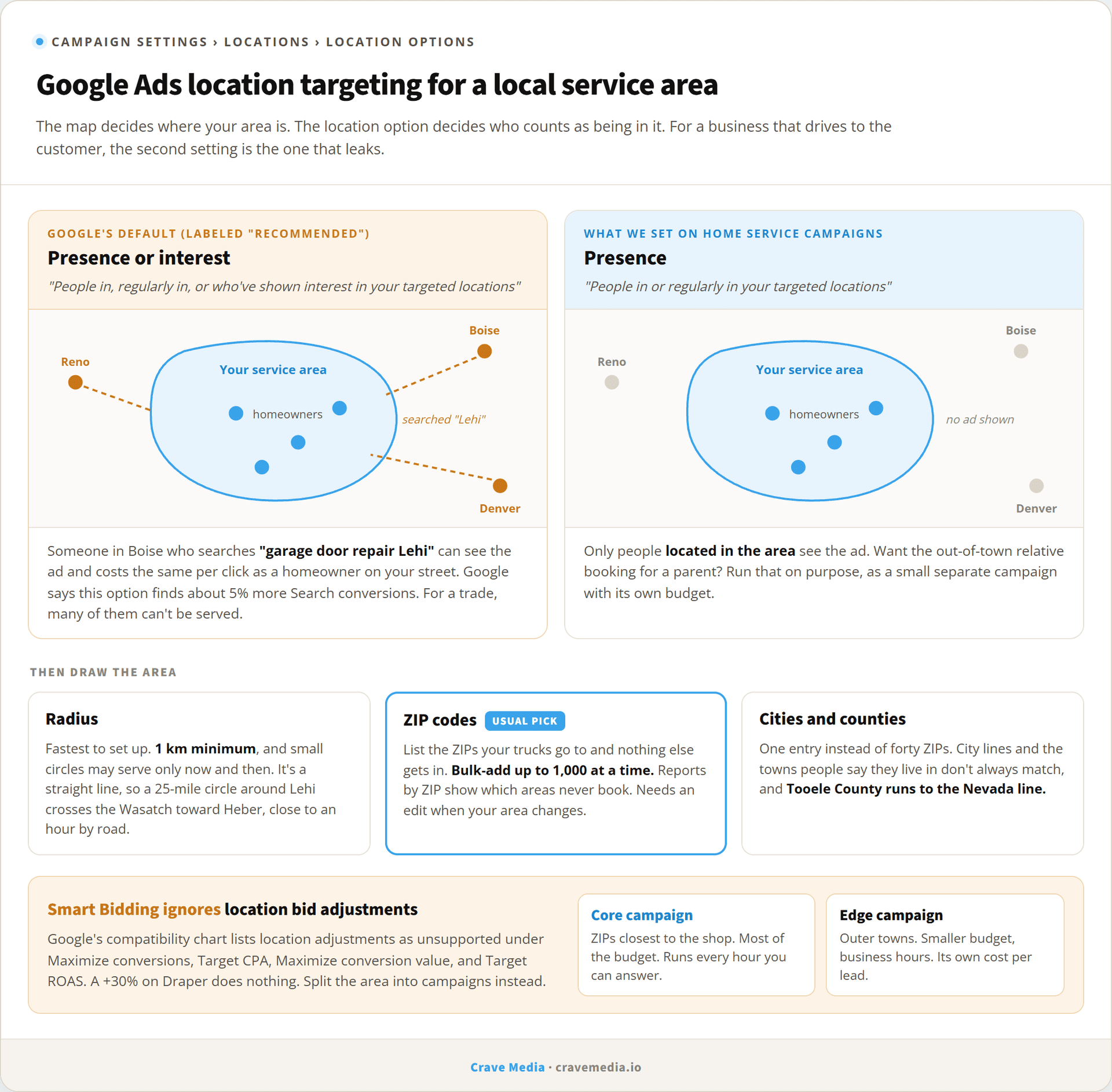
"Presence or interest" reaches, in Google's words, people "in, regularly in, or who've shown interest in your targeted locations." It's the default on new campaigns, and Google labels it the recommended option. "Presence" reaches people "in or regularly in your targeted locations." That's it. Showing interest doesn't count.
That word "interest" covers a lot of ground. A person in Boise who searches "garage door repair Lehi" has shown interest in Lehi. So has someone who's looked at Lehi content, or who Google thinks is planning a trip. Under the default, any of them can see your ad, click it, and cost you the same as a homeowner on your street.
Google's case for the default is that it finds more conversions. Its help page says advertisers who switched from Presence to Presence or interest saw "+5% more conversions on Search campaigns." We believe that for a hotel, a wedding venue, or a moving company. For a business that has to show up at the customer's house, a conversion from someone 300 miles away is usually a form fill you can't do anything with. Count it as a conversion and automated bidding will go looking for more people like them.
There is a real buyer hiding in the interest bucket: the adult kid in Denver booking a furnace repair for a parent in Orem. Those jobs exist. In the accounts we've audited they're a thin slice next to the out-of-area clicks that never turn into anything.
Our position, for every home service campaign we run: switch to Presence. Ignore the "recommended" tag. If you ever want to chase the out-of-town relative, do it on purpose, with a small separate campaign and its own budget, so you can see whether it pays.
While you're in Location options, note that exclusions work on presence by default. Excluding a town keeps your ads from people who are likely located there. It doesn't stop someone outside your area from seeing your ad because they searched for a town you serve. Only the targeting option fixes that.
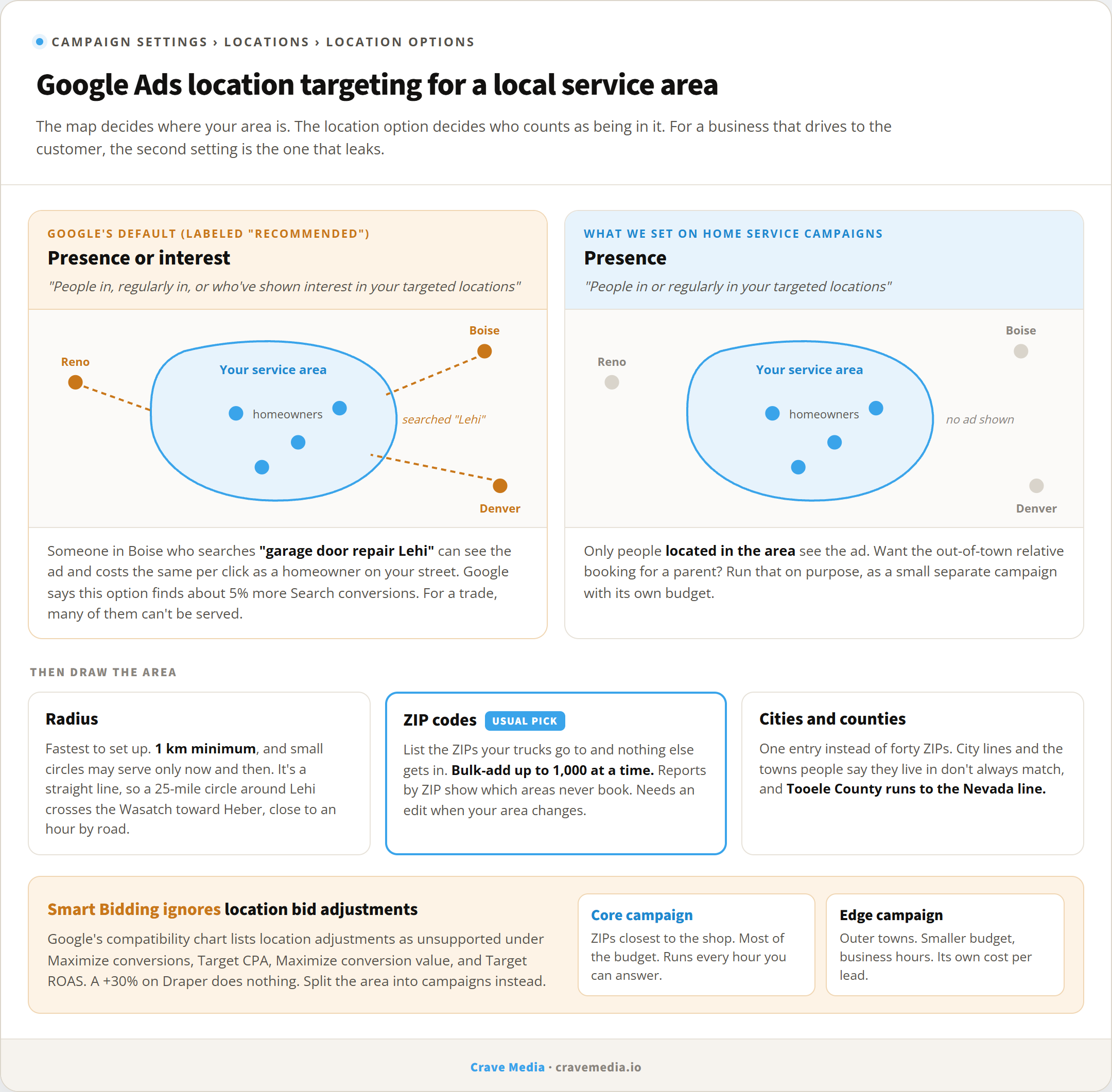
Presence or interest is Google's default. For a business that drives to the customer, Presence is the safer setting.
Radius, ZIP code, or city targeting
Once the option is right, the map matters. You have three practical ways to draw a service area, and you can mix them.
Radius targeting
The fastest to set up. Drop a pin on your shop, pick a distance, done. Google's minimum is 1 km, and it warns that small targets "might only show intermittently or not at all," so a tiny circle around one neighborhood can quietly fail to serve.
The problem with a radius is that it's a straight line, and Utah isn't flat. A 25-mile circle around Lehi reaches Salt Lake City and Provo, which is about right. It also pokes over the Wasatch toward Heber, which is about 25 miles as the crow flies and the better part of an hour by road through Provo Canyon. A radius knows distance. It has never heard of a canyon.
ZIP code targeting
Our usual pick for a business with a defined area. You list the ZIP codes your trucks go to, and nothing else gets in. Google lets you paste up to 1,000 locations at a time in bulk, so a long list isn't a chore.
ZIPs also make your reports more useful later, because you can see cost and leads by ZIP and cut the ones that never book. The tradeoff is upkeep. When you add a crew or stop driving to a town, someone has to edit the list.
City and county targeting
Simple, and fine for a business that serves whole cities. "Salt Lake County" is one entry instead of forty ZIPs. The catch is that city lines and the towns people say they live in don't always match, and a county can be bigger than you think. Tooele County stretches out to the Nevada line.
For most of the home service accounts we set up, the answer is ZIPs or a short city list for the core, and a radius only when the business truly will go anywhere within an hour.
Exclusions for the edges
Exclusions are for the holes inside your shape. Say the Lehi company targets a radius but won't go up into a mountain subdivision, or into a town a sister franchise covers. Add those as excluded locations and ads stop showing to people located there.
Location exclusions handle where the searcher is. Search wording is a separate job. A homeowner in Lehi searching "garage door repair Logan" for a parent's house is inside your targeting and outside your service area. Location settings can't stop that search. Negative keywords can, by blocking the names of towns you don't serve, which we cover in negative keywords every local service business needs.
Bid adjustments by area, and when they're ignored
The old advice was to bid up in your best ZIPs and down at the edges. Under manual bidding that still works: set a percentage up or down for a location and Google applies it.
Most local accounts don't run manual bidding anymore. If yours uses Smart Bidding, meaning Maximize conversions, Target CPA, Maximize conversion value, or Target ROAS, Google's own compatibility chart shows location bid adjustments as unsupported. You can enter +30% for Draper, the field will accept it, and the bid strategy will do what it was going to do anyway. We find leftover adjustments like this in a lot of audits, sitting there doing nothing, with the owner sure they're working.
Under Smart Bidding, the lever is the campaign. If one part of your area is worth more, give it its own campaign with its own budget. A common setup for us is a core campaign for the ZIPs closest to the shop and a second, smaller one for the edge towns. The core never runs out of money because the edges spent it, and you get a clean read on what each area costs per lead. If you're working out how much each should get, start with how much a local business should spend on Google Ads.
The same split helps with hours. An emergency plumber who only has an on-call tech for the core ZIPs overnight can run the edge campaign during business hours only. We went through that scheduling logic in Google Ads for emergency services.
Checking where your ads showed
Set it and check it. In Google Ads, go to Insights and reports, then "When and where your ads showed." The Matched locations view shows the locations that triggered your ads, which, per Google, "could be users' physical locations or locations of interest."
The built-in view mixes the two. To see where people physically were, you need a custom report in Report editor using the user location fields, down to the most specific location (usually ZIP or city). Build it once, save it, and check it monthly. If you switched to Presence and still see real spend from outside your area, look at what's targeted. A radius that's too wide or a county that's too big are the usual causes.
Pair that report with call data, too. A ZIP with plenty of clicks and no booked jobs is a candidate to cut, and you'll only see that if calls are tracked back to the campaign, which is what call tracking for Google Ads sets up.
Ads reach where the map pack can't
One more reason to get this right. Your Google Business Profile ranks in the map pack from the address you verified, usually within a few miles of it, and listing more service areas doesn't stretch that. We covered why in how to rank on Google Maps without a storefront. Ads don't have that limit. If the Lehi company wants calls from Spanish Fork this month, a campaign targeting Spanish Fork's ZIPs can get its ad in front of Spanish Fork homeowners tomorrow.
That only helps if the targeting is clean. Point Google at the towns you want and leave the default option on, and some of that budget goes to people searching about Spanish Fork from somewhere else.
Target the drive, not the circle
Google will happily draw your service area as a circle, plus everyone who has ever wondered about the places inside it. Your trucks don't work that way. They go where the roads go, to the ZIPs that book, and nowhere near Boise. Draw the targeting the way you'd draw the dispatch board, switch it to Presence, and you've fixed most of what we see wrong in local accounts before touching a single keyword.
If you're not sure what your campaigns are set to, it takes about two minutes to check, and we're happy to do it. Our Google Ads management starts with exactly this kind of settings review. Request a free audit and we'll show you where your ads have been showing and what it's cost you.

About the author
Zac Spencer is an online marketing specialist and the owner of Crave Media, based in Salt Lake City, Utah. Since 2013 he has managed hundreds of Google Ads accounts across dozens of industries — with budgets from a few hundred dollars to $250K a month — and run SEO for local businesses, ecommerce shops, and international franchises.